
Overview
If a job has been assigned to the wrong driver, TCMS allows you to unassign the order so it can be reassigned correctly.
This action can only be performed from the Transport Orders page, ensuring controlled and intentional unassignment.
How to Unassign an Order from a Driver
Follow the steps below to unassign one or multiple orders:
-
Navigate to the Transport Orders page.
-
Select the order(s) you want to unassign.
-
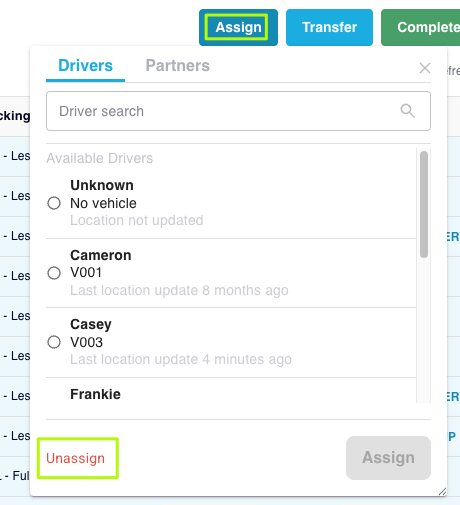
Click Assign from the action bar at the top of the page.
-
In the dropdown panel, look to the bottom-left corner and click the red Unassign link.
-
A confirmation screen will appear.
-
Select Unassign to confirm the action.
Once completed, the order(s) will no longer be assigned to the previous driver and can be reassigned as needed.
Important Notes
Unassigning is only available on the Transport Orders page
You cannot unassign a job from:
-
Explore View
-
Task List View
Alternative Options
If you're working in Explore or Task List and assignment needs correcting, you can:
-
Reassign directly to another driver
-
Assign the order to the "Unknown" driver
-
Or return to the Transport Orders page to officially unassign it
Use Cases
Unassigning is helpful when:
-
A driver was assigned by mistake
-
A driver is unavailable or off-shift
-
Tasks were optimised incorrectly
-
A dispatcher wants to reset the job before reallocation