
What driver message notifications do
When a driver sends you an instant message (IM), Yojee can alert you straight away, even if you are working in another tab or app. Before this, the only signal was the unread count in the left navigation, which you only see when the dispatcher portal is on screen.
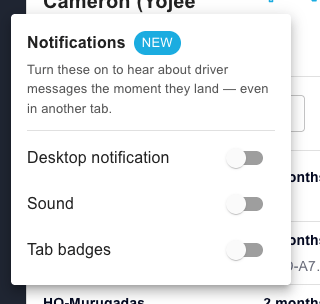
You can switch on any of three alerts. Each one works on its own.
- Desktop notification. A pop-up from your browser in the corner of your screen, showing the driver's name and their message. It appears even when the dispatcher portal tab is in the background. Click it to jump straight to that driver's conversation.
- Sound. A short chime when a driver message arrives.
- Tab count. The number of unread driver messages shows in the browser tab title, for example (3), so you can spot it in your row of tabs.
Who it is for: controllers and dispatchers who message drivers from the dispatcher portal.
Availability: on all accounts. Each user turns the alerts on for themselves, so your settings do not change anyone else's.
Good to know: all three alerts are off until you turn them on.
Turn on message notifications
The settings live inside the chat window, not on a separate settings page.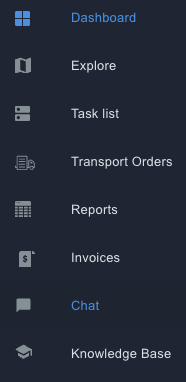
- In the dispatcher portal, open the Chat panel.
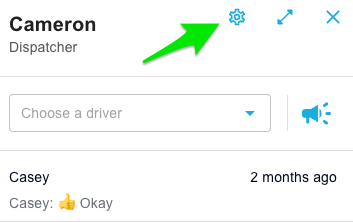
- In the panel header, next to your name, select the settings icon.
- Switch on the alerts you want: Desktop notifications, Sound and Tab badge.
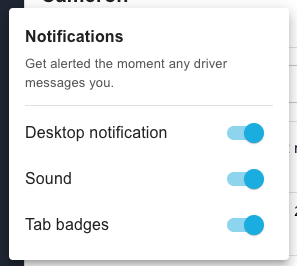
- If you switched on desktop notifications, your browser asks for permission to show notifications. Select Allow.
Your choices are saved to your user, so they apply each time you sign in.
What happens when a driver messages you- Desktop notification: appears in the corner of your screen with the driver's name and message. Click it to bring the dispatcher portal to the front with that driver's conversation open.
- Sound: one chime plays for each new message, or once for a quick burst of messages from the same driver.
- Tab count: the tab title shows the number of unread driver messages. It clears when you open and read the conversations.
If a driver sends several messages in quick succession, you get one desktop notification that updates, rather than a stack of pop-ups. The unread counts always show the true total.
What does not trigger an alert
Only messages from drivers raise an alert. These do not:
- Messages you send.
- Messages from other controllers.
- Broadcasts sent to several drivers at once.
- System or automated messages.
- Messages that were already unread when you signed in. These still show in the unread count, but they do not pop up as new alerts.
- The dispatcher portal must be open in a tab. Alerts work when the tab is in the background, but not when the tab or browser is closed.
- Browser permission is per browser. If you use a second browser or computer, allow notifications there too.
- Your computer's own settings apply. Focus modes, Do Not Disturb and system notification settings can hide desktop notifications.
- Some browsers block sound until you interact with the page. If the chime does not play, click anywhere in the dispatcher portal once.
Troubleshooting
I switched on desktop notifications but nothing pops up.
- Check you selected Allow when the browser asked. If you selected Block, allow notifications for the dispatcher portal in your browser's site settings, then reload the page.
- Check your computer allows notifications from your browser (macOS: System Settings > Notifications; Windows: Settings > System > Notifications).
- Check Focus or Do Not Disturb is off.
I do not see the settings icon in the chat panel.
- Reload the page. If it is still missing, contact Yojee support.
The tab count does not clear.
- Open each driver conversation with unread messages. The count drops as you read them.
Can I choose a different sound, set quiet hours or mute one driver?
- Not at this stage. Contact Yojee support if you need any of these, so we can log the request.
Can drivers turn this on?
- No. These alerts are for dispatcher portal users. Drivers already get notifications in the driver app.