
Overview
The Daily Distance Report gives dispatchers and managers a clear picture of how far each driver has travelled on any given day. It combines distances between completed tasks with virtual "depot legs" (the driver's journey from their start location to the first task, and from the last task back to their depot) to produce accurate, end-to-end daily mileage.
This report is useful for:
- Fleet utilisation and cost monitoring
- Driver invoicing and payroll validation
- Compliance and kilometre auditing
- Understanding vehicle usage patterns
How to Access the Report

- Navigate to Reports in the main menu.
- Select the Daily Distance tab (located to the left of the Invoicing report).
Filters
The report supports two filters at the top of the page:
Date range — Choose from the following presets or set a custom range: Yesterday, This Week, Last Week, Last 7 Days, Last 14 Days, This Month, Last Month, Last Year, Year to Date, Custom
Driver — Filter results to one or more specific drivers.
Once filters are applied, the results update automatically. The header bar shows the total number of records returned (e.g. Displaying 39 of 39 results).
Report Columns
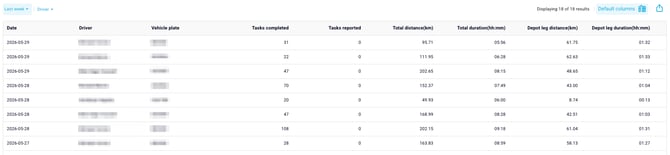
| Column | Description |
|---|---|
| Date | The calendar date the tasks were completed (based on company timezone). |
| Driver | The driver's full name. |
| Vehicle Plate | The vehicle plate number registered to the driver for that day. |
| Tasks Completed | The number of tasks (pickups and deliveries) completed by the driver via the TCMS Driver App on that date. |
| Tasks Reported | The number of tasks marked complete by a dispatcher or system process (not driver-completed via the app). These tasks do not contribute to duration calculations. |
| Total Distance (km) | The total routed distance for all legs driven that day, including both between-task legs and depot legs. Displayed in kilometres, rounded to 2 decimal places. |
| Total Duration (hh:mm) | The total time across all legs, displayed in hours and minutes. Calculated from actual driver task completion timestamps where available. |
| Depot Leg Distance (km) | The distance of the virtual depot legs only — the driver's journey from their Start Location to the first task, and from the last task to their End Location. Shown as a subset of Total Distance. |
| Depot Leg Duration (hh:mm) | The duration of the depot legs only, also shown as a subset of Total Duration. |
How Distances Are Calculated
TCMS calculates distances for every leg a driver travels during the working day. A "leg" is the route between two consecutive waypoints.
Step 1 — Build the day's route
For each driver on each date, TCMS constructs an ordered sequence of waypoints using the actual completion timestamps of their tasks:
Start Location → Task 1 → Task 2 → ... → Task N → End Location- Start Location and End Location are configured in the driver's profile. If these are not set, depot legs will not be calculated.
- If a driver has no completed tasks on a given day, no mileage is recorded.
📸 [Screenshot placeholder: Driver profile settings showing Start Location and End Location fields]
Step 2 — Calculate distances between waypoints
For each leg in the sequence, TCMS uses a routing service (such as Google Maps Routes API) to calculate the actual road distance and estimated drive time between the two waypoints.
- If the routing service is unavailable, TCMS falls back to a haversine (straight-line) distance estimate and marks the leg accordingly.
- If either waypoint is missing geocoding (latitude/longitude), that leg's distance is recorded as NULL and excluded from the total.
Step 3 — Calculate durations
Duration for each leg is calculated using the difference between consecutive driver task completion timestamps:
Duration of Leg N = Completion Time of Task N − Completion Time of Task N−1- Only applies where both timestamps are genuine driver-app completions (not bulk or dispatcher completions).
- Depot legs (Start → first task, last task → End) use routing-estimated durations from the routing service.
Step 4 — Aggregate totals
Per-driver, per-day totals are summed across all legs. These totals are stored and can be recomputed if a task completion is edited or added retrospectively.
What Are Depot Legs?
Depot legs are virtual (analytics-only) legs that represent the part of a driver's day not covered by their assigned tasks:
- First depot leg: Driver's Start Location → location of their first completed task
- Last depot leg: Location of their last completed task → Driver's End Location
These legs are included in the Total Distance and Total Duration columns, and are also broken out separately in the Depot Leg Distance and Depot Leg Duration columns so you can see how much of a driver's day was spent travelling to and from the depot.
Note: Depot legs only appear if the driver has a Start Location and/or End Location set in their profile. If these are not configured, only between-task legs will be calculated and the Depot Leg columns will show zero or NULL.
Frequently Asked Questions
Why does a driver show zero for depot legs? The driver's Start Location or End Location has not been configured in their profile. Ask your TCMS administrator to set these fields. Once configured, depot legs will be calculated for future days. Historical data can be backfilled on request.
Why is Tasks Reported showing 0? Tasks Reported reflects tasks completed by a dispatcher or system process rather than the driver via the app. A value of 0 is normal for drivers who complete all tasks directly on their device.
Why are some duration values blank or showing NULL? This occurs when a waypoint is missing geocoding data. The distance and duration for that specific leg cannot be calculated and is excluded from the total.
The report shows no data for a driver. Why? If a driver had no app-completed tasks on the selected date, no mileage row is generated. Check the Driver Activity report to confirm whether any tasks were completed on that date.
Can I see leg-level (task-by-task) detail rather than daily totals? Not in the current version. The Daily Distance Report shows one row per driver per day. Leg-level breakdowns may be added in a future release.
Known Limitations
- Missing geocoding: If task addresses are not geocoded, distance for those legs cannot be calculated and will be excluded from totals.
- Routing accuracy: Distances reflect routed road distances. In areas where the routing service has limited data, the haversine (straight-line) fallback is used and may underestimate actual distance.