---
title: "Understanding Yojee Terminology: Key Concepts for Seamless Operations"
description: Explore Yojee's key terminology, including senders, orders, items, legs, partners, and quantities. Learn how these concepts work together to streamline your logistics operations.
---
[Skip to content](https://help.yojee.com/tcms/yojee-terminology#main-content)
English
Show submenu for translations

- Knowledge Base
Open main navigation
Close main navigation
- Knowledge Base
- English
Show submenu for translations
- [Go to yojee.com](https://www.yojee.com/)
[Go to yojee.com](https://www.yojee.com/)
Hello. How can we help you?
- There are no suggestions because the search field is empty.
1. [TCMS](https://help.yojee.com/tcms?hsLang=en)
2. [FAQ and Glossary](https://help.yojee.com/tcms/faq-and-glossary?hsLang=en)
3. [Glossary](https://help.yojee.com/tcms/faq-and-glossary?hsLang=en#glossary)
# Understanding Yojee Terminology: Key Concepts for Seamless Operations
## A guide to essential Yojee terms like senders, orders, items, legs, and quantities to help you navigate and configure the platform effectively.
### **Overview**
### 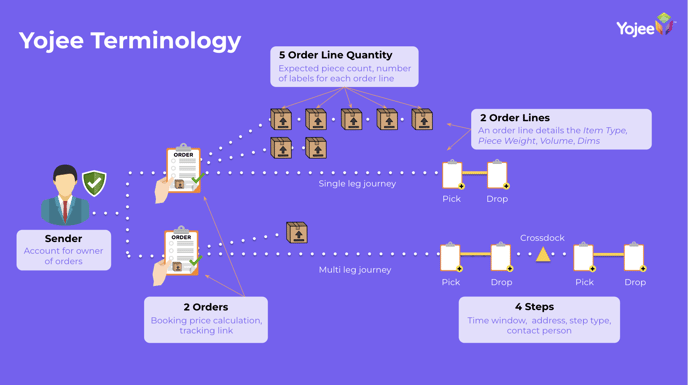
The **Yojee platform** uses standardised, user-friendly terminology to support a wide range of logistics workflows. This guide provides clear explanations of key terms like **senders**, **orders**, **items**, **legs**, **partners**, and **quantities**, helping you navigate Yojee with ease.
---
### **1. Sender**
A **Sender** refers to the person or company initiating the consignment of goods. It can be:
- An **individual** (e.g., a person sending a package).
- A **corporate entity** (e.g., a company shipping goods).
**Important**: A sender must be added to Yojee before an order can be created.
---
### **2. Partner**
A **Partner** refers to a third-party delivery service provider (delivery partner) responsible for completing tasks, such as pickups and drop-offs. Partners are essential for extending your logistics capabilities.
#### **How to Work with Partners**
1. **Transferring Tasks**: Tasks or orders can be transferred to a partner for completion.
2. **Visibility**: Partners receive order details and updates, enabling efficient execution.
3. **Milestones and Proof of Delivery**: Milestones (e.g., pickup, in transit, and drop-off) are recorded and reflected back in Yojee. Partners can also upload **Proof of Delivery (POD)**.
#### **Why Partners Are Important**
- Enable seamless collaboration with external delivery providers.
- Ensure smooth task handovers and real-time tracking.
- Extend your operational reach to meet customer demands.
---
### **3. Order Booking**
An **Order** represents the movement of goods from one location to another. Orders consist of:
#### **Order Components**
- **Sender**: The person or company sending the goods.
- **Order Details**: Information such as booking references and special instructions.
- **Reference Numbers**: Customisable fields to align with your internal systems.
- **Service Types**: Defines the type of service, e.g., same-day delivery, bulk transport.
- **Packing Mode**: Specifies how items are packed (FTL - Full Truck Load, LTL - Less than Truck Load, CNT - Container).
- **Booking Information**: Details like delivery dates and required timeframes.
- **Legs**: Pickup and drop-off tasks with address and contact details.
- **Items**: Includes descriptions, dimensions, weight, volume, and type of delivery unit.
---
### **4. Leg**
A **Leg** is a logistical segment within an order that includes a **pickup** and **drop-off** task.
**Key Features**:
- Each order can have multiple legs to represent complex movements (e.g., multi-stop deliveries).
- Legs are configured via **Templates** under the **Manage** section.
---
### **5. Item**
An **Item** represents a single delivery unit such as:
- A **package** (e.g., carton).
- A **pallet**.
- A **container**.
Items are:
- Linked to each leg in a booking.
- Managed and dispatched either **individually** or **in bulk**.
---
### **6. Quantity**
The **Quantity** field defines the count of outer units within an order.
#### **How to Use Quantity**:
- **Tracking Individual Items**:
- Set the quantity to **1** per item to generate individual labels (e.g., tracking 5 packages = 5 items with quantity 1).
- **Tracking Bulk Movements**:
- Use one item with a larger quantity.
- Example: Moving a full load of **22 pallets** = 1 item with quantity **22**.
#### **Adjusting Quantities**:
- Drivers can update quantities using the **Yojee Driver App** if fewer items are collected or delivered (e.g., short deliveries).
- Any changes will reflect on the **Dispatcher View** and in the **Proof of Delivery (POD)**.
---
### **7. Additional Notes**
- **Templates**: Configure the order structure, including legs and item types, in the **Templates** section under **Manage**.
- [Learn how to configure templates here.](https://help.yojee.com/knowledge/templates?hsLang=en)
---
### **Key Terminology Recap**
- **Sender**: Person or company initiating the order.
- **Order**: Represents the movement of goods.
- **Leg**: A pickup and drop-off segment.
- **Partner**: Third-party delivery provider.
- **Item**: A delivery unit (e.g., package, pallet).
- **Quantity**: Defines the count of items or units being moved.
- [Quick Start Guides](https://help.yojee.com/tcms/quick-start-guides?hsLang=en)
- [Power Up with Yojee - Training Sessions](https://help.yojee.com/tcms/power-up-with-yojee-training-sessions?hsLang=en)
- [Dispatchers](https://help.yojee.com/tcms/dispatchers?hsLang=en#main-content)
- [Creating Orders](https://help.yojee.com/tcms/dispatchers?hsLang=en#creating-orders)
- [Managing Orders](https://help.yojee.com/tcms/dispatchers?hsLang=en#managing-orders)
- [Dispatching Orders](https://help.yojee.com/tcms/dispatchers?hsLang=en#dispatching-orders)
- [Tracking Orders](https://help.yojee.com/tcms/dispatchers?hsLang=en#tracking-orders)
- [Partners](https://help.yojee.com/tcms/dispatchers?hsLang=en#partners)
- [Network](https://help.yojee.com/tcms/dispatchers?hsLang=en#network)
- [Drivers](https://help.yojee.com/tcms/drivers?hsLang=en)
- [Senders](https://help.yojee.com/tcms/senders?hsLang=en)
- [Partners](https://help.yojee.com/tcms/partners?hsLang=en)
- [Manage](https://help.yojee.com/tcms/manage?hsLang=en#main-content)
- [Account](https://help.yojee.com/tcms/manage?hsLang=en#account)
- [Users](https://help.yojee.com/tcms/manage?hsLang=en#users)
- [Fleet](https://help.yojee.com/tcms/manage?hsLang=en#fleet)
- [Drivers](https://help.yojee.com/tcms/manage?hsLang=en#drivers)
- [Addresses](https://help.yojee.com/tcms/manage?hsLang=en#addresses)
- [Customers](https://help.yojee.com/tcms/manage?hsLang=en#customers)
- [Orders](https://help.yojee.com/tcms/manage?hsLang=en#orders)
- [Planning](https://help.yojee.com/tcms/manage?hsLang=en#planning)
- [Documentation](https://help.yojee.com/tcms/manage?hsLang=en#documentation)
- [Finance](https://help.yojee.com/tcms/manage?hsLang=en#finance)
- [Partners](https://help.yojee.com/tcms/manage?hsLang=en#partners)
- [Analytics](https://help.yojee.com/tcms/analytics?hsLang=en#main-content)
- [Dashboards](https://help.yojee.com/tcms/analytics?hsLang=en#dashboards)
- [Reports](https://help.yojee.com/tcms/analytics?hsLang=en#reports)
- [API Documentation](https://help.yojee.com/tcms/api-documentation?hsLang=en)
- [FAQ and Glossary](https://help.yojee.com/tcms/faq-and-glossary?hsLang=en#main-content)
- [Drivers & Planning](https://help.yojee.com/tcms/faq-and-glossary?hsLang=en#drivers-planning)
- [Glossary](https://help.yojee.com/tcms/faq-and-glossary?hsLang=en#glossary)
- [Reports](https://help.yojee.com/tcms/faq-and-glossary?hsLang=en#reports)
- [Other](https://help.yojee.com/tcms/faq-and-glossary?hsLang=en#other)
- [Release Notes](https://help.yojee.com/tcms/release-notes?hsLang=en#main-content)
- [Release Notes 2026](https://help.yojee.com/tcms/release-notes?hsLang=en#release-notes-2026)
- [Release Notes 2025](https://help.yojee.com/tcms/release-notes?hsLang=en#release-notes-2025)
- [Release Notes 2024](https://help.yojee.com/tcms/release-notes?hsLang=en#release-notes-2024)
- [Release Notes 2023](https://help.yojee.com/tcms/release-notes?hsLang=en#release-notes-2023)
- [Release Notes 2022](https://help.yojee.com/tcms/release-notes?hsLang=en#release-notes-2022)
- [Release Notes 2021](https://help.yojee.com/tcms/release-notes?hsLang=en#release-notes-2021)
- [Release Notes 2020](https://help.yojee.com/tcms/release-notes?hsLang=en#release-notes-2020)
- [New Starter Training](https://help.yojee.com/tcms/new-starter-training?hsLang=en#main-content)
- [Level 1](https://help.yojee.com/tcms/new-starter-training?hsLang=en#level-1)
[](https://www.yojee.com)
TCMS Knowledge Base
[mailto:support@yojee.com](mailto:support@yojee.com)
Copyright © 2026 Yojee Pte Ltd