---
title: Understanding Geocoding in TCMS
description: Learn how geocoding works in TCMS, how to identify whether an address has been successfully geocoded, and how to resolve mapping issues to ensure accurate routing and delivery execution.
---
[Skip to content](https://help.yojee.com/tcms/what-is-geocoding#main-content)
English
Show submenu for translations

- Knowledge Base
Open main navigation
Close main navigation
- Knowledge Base
- English
Show submenu for translations
- [Go to yojee.com](https://www.yojee.com/)
[Go to yojee.com](https://www.yojee.com/)
Hello. How can we help you?
- There are no suggestions because the search field is empty.
1. [TCMS](https://help.yojee.com/tcms?hsLang=en)
2. [FAQ and Glossary](https://help.yojee.com/tcms/faq-and-glossary?hsLang=en)
3. [Drivers & Planning](https://help.yojee.com/tcms/faq-and-glossary?hsLang=en#drivers-planning)
# Understanding Geocoding in TCMS
## Learn how geocoding works in TCMS, how to confirm whether an address has been successfully geocoded, and what to do if it hasn’t.
### Overview
Geocoding is the process of converting a physical address into geographic coordinates (latitude and longitude).
In TCMS, geocoding ensures:
- Drivers are routed to the correct location
- Jobs appear accurately on the map
- Distance calculations and ETAs are reliable
- Route optimisation functions correctly
If an address is not properly geocoded, it can result in incorrect routing, delays, or delivery failures.
---
### How to Identify if an Address Has Been Geocoded
You can quickly identify whether an address has been successfully geocoded by checking the background colour of the address fields.
### ✅ Geocoded Address
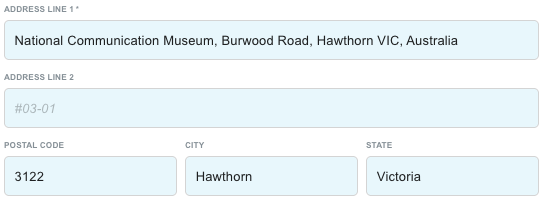
- The address field will display a **blue background hue**
- This confirms TCMS has successfully converted the address into map coordinates
### ⚪ Not Geocoded
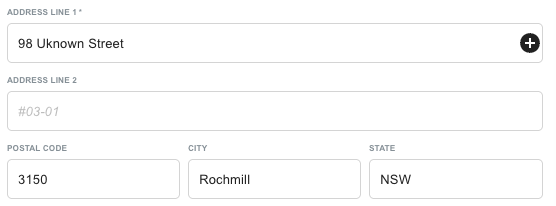
- The address field background will be **white**
- This means the system has not yet successfully geocoded the address
If the field remains white, the address may be incomplete, incorrectly formatted, or missing required information.
---
### How to Ensure Accurate Geocoding
Follow these steps to confirm or correct address geocoding:
### 1. Verify the Address on the Map
- Open the order in **Explore View**
- Confirm the map pin is positioned correctly
- Check that the location matches the intended delivery or pickup site
If the pin location is incorrect, action is required.
### 2. Reselect the address
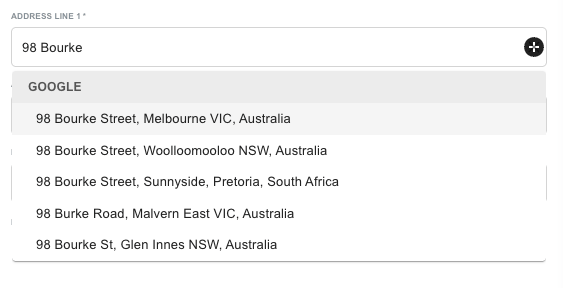
If the address is incomplete or maps incorrectly:
- Re-type the address in Address Line 1
- Select the correct address
- Save the update
Refer to the [**Editing Orders for Missing Information**](https://help.yojee.com/knowledge/why-do-i-see-missing-info?hsLang=en) article for step-by-step instructions.
---
### 3. Update the Address in the Address Book
If the issue is likely to occur again (e.g. repeat customer or site):
- Navigate to **Address Book**
- Find the address that has been geocoded incorrectly
- Update Address Line 1 and related fields
- Ensure the Contact Name is correctly populated
**Important:**
For proper geocoding when using the Address Book, the address must match both:
- Address Line 1
- Contact Name
This ensures the correct record is selected and geocoded consistently.
---
### Common Reasons an Address Fails to Geocode
- Missing street number
- Incorrect suburb or postcode
- Typographical errors
- Abbreviated or partial address details
- Mismatch between Address Line 1 and Contact Name
Ensuring complete and standardised formatting significantly improves geocoding success.
---
### Why Accurate Geocoding Matters
Accurate geocoding directly impacts operational performance.
### Route Optimisation
Precise coordinates enable accurate routing and distance calculations.
### On-Time Delivery
Drivers are sent to the correct location the first time.
### Reporting Accuracy
Distance, ETA, and driver performance metrics rely on geocoded data.
### Customer Experience
Reduces delivery errors and failed attempts.
---
#### Key Takeaways
- A **blue address field** confirms successful geocoding
- A **white address field** means the address has not been geocoded
- Always verify the pin location in Explore View
- Update the Address Book to prevent recurring issues
- Accurate address formatting improves routing, ETAs, and delivery success
- [Quick Start Guides](https://help.yojee.com/tcms/quick-start-guides?hsLang=en)
- [Power Up with Yojee - Training Sessions](https://help.yojee.com/tcms/power-up-with-yojee-training-sessions?hsLang=en)
- [Dispatchers](https://help.yojee.com/tcms/dispatchers?hsLang=en#main-content)
- [Creating Orders](https://help.yojee.com/tcms/dispatchers?hsLang=en#creating-orders)
- [Managing Orders](https://help.yojee.com/tcms/dispatchers?hsLang=en#managing-orders)
- [Dispatching Orders](https://help.yojee.com/tcms/dispatchers?hsLang=en#dispatching-orders)
- [Tracking Orders](https://help.yojee.com/tcms/dispatchers?hsLang=en#tracking-orders)
- [Partners](https://help.yojee.com/tcms/dispatchers?hsLang=en#partners)
- [Network](https://help.yojee.com/tcms/dispatchers?hsLang=en#network)
- [Drivers](https://help.yojee.com/tcms/drivers?hsLang=en)
- [Senders](https://help.yojee.com/tcms/senders?hsLang=en)
- [Partners](https://help.yojee.com/tcms/partners?hsLang=en)
- [Manage](https://help.yojee.com/tcms/manage?hsLang=en#main-content)
- [Account](https://help.yojee.com/tcms/manage?hsLang=en#account)
- [Users](https://help.yojee.com/tcms/manage?hsLang=en#users)
- [Fleet](https://help.yojee.com/tcms/manage?hsLang=en#fleet)
- [Drivers](https://help.yojee.com/tcms/manage?hsLang=en#drivers)
- [Addresses](https://help.yojee.com/tcms/manage?hsLang=en#addresses)
- [Customers](https://help.yojee.com/tcms/manage?hsLang=en#customers)
- [Orders](https://help.yojee.com/tcms/manage?hsLang=en#orders)
- [Planning](https://help.yojee.com/tcms/manage?hsLang=en#planning)
- [Documentation](https://help.yojee.com/tcms/manage?hsLang=en#documentation)
- [Finance](https://help.yojee.com/tcms/manage?hsLang=en#finance)
- [Partners](https://help.yojee.com/tcms/manage?hsLang=en#partners)
- [Analytics](https://help.yojee.com/tcms/analytics?hsLang=en#main-content)
- [Dashboards](https://help.yojee.com/tcms/analytics?hsLang=en#dashboards)
- [Reports](https://help.yojee.com/tcms/analytics?hsLang=en#reports)
- [API Documentation](https://help.yojee.com/tcms/api-documentation?hsLang=en)
- [FAQ and Glossary](https://help.yojee.com/tcms/faq-and-glossary?hsLang=en#main-content)
- [Drivers & Planning](https://help.yojee.com/tcms/faq-and-glossary?hsLang=en#drivers-planning)
- [Glossary](https://help.yojee.com/tcms/faq-and-glossary?hsLang=en#glossary)
- [Reports](https://help.yojee.com/tcms/faq-and-glossary?hsLang=en#reports)
- [Other](https://help.yojee.com/tcms/faq-and-glossary?hsLang=en#other)
- [Release Notes](https://help.yojee.com/tcms/release-notes?hsLang=en#main-content)
- [Release Notes 2026](https://help.yojee.com/tcms/release-notes?hsLang=en#release-notes-2026)
- [Release Notes 2025](https://help.yojee.com/tcms/release-notes?hsLang=en#release-notes-2025)
- [Release Notes 2024](https://help.yojee.com/tcms/release-notes?hsLang=en#release-notes-2024)
- [Release Notes 2023](https://help.yojee.com/tcms/release-notes?hsLang=en#release-notes-2023)
- [Release Notes 2022](https://help.yojee.com/tcms/release-notes?hsLang=en#release-notes-2022)
- [Release Notes 2021](https://help.yojee.com/tcms/release-notes?hsLang=en#release-notes-2021)
- [Release Notes 2020](https://help.yojee.com/tcms/release-notes?hsLang=en#release-notes-2020)
- [New Starter Training](https://help.yojee.com/tcms/new-starter-training?hsLang=en#main-content)
- [Level 1](https://help.yojee.com/tcms/new-starter-training?hsLang=en#level-1)
[](https://www.yojee.com)
TCMS Knowledge Base
[mailto:support@yojee.com](mailto:support@yojee.com)
Copyright © 2026 Yojee Pte Ltd