---
title: Understanding Planning Status and Delivery Status in Yojee TCMS
description: Learn how Planning Status and Delivery Status work in Yojee TCMS. Understand order lifecycle states, track real-time delivery progress, and filter orders across Transport Orders and reports.
---
[Skip to content](https://help.yojee.com/tcms/understanding-and-using-the-delivery-status-field-in-yojee-tcms#main-content)
English
Show submenu for translations

- Knowledge Base
Open main navigation
Close main navigation
- Knowledge Base
- English
Show submenu for translations
- [Go to yojee.com](https://www.yojee.com/)
[Go to yojee.com](https://www.yojee.com/)
Hello. How can we help you?
- There are no suggestions because the search field is empty.
1. [TCMS](https://help.yojee.com/tcms?hsLang=en)
2. [Dispatchers](https://help.yojee.com/tcms/dispatchers?hsLang=en)
3. [Managing Orders](https://help.yojee.com/tcms/dispatchers?hsLang=en#managing-orders)
# Understanding Planning Status and Delivery Status in Yojee TCMS
## Track both operational progress and planning stages of orders across dispatch, reports, and transport operations.
### 
#### **Overview**
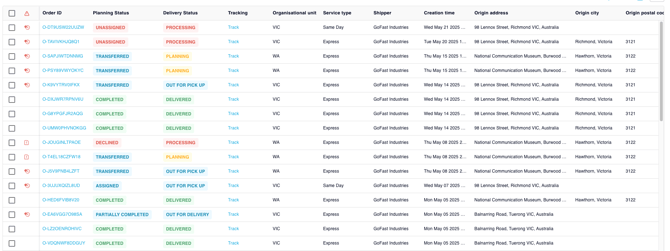
Yojee TCMS provides **two complementary status indicators** to help teams track orders throughout their lifecycle:
- **Planning Status** - reflects the **internal preparation and allocation state** of the order (dispatch workflow).
- **Delivery Status** - reflects the **live operational progress** of the order during execution.
Together, these statuses give dispatchers and operations teams a **complete view of an order’s lifecycle**, from creation and planning through to final delivery.
---
### **Planning Status**
Planning Status shows **how an order is being managed internally by dispatch**.
It reflects the state of assignment, transfer, and completion within the planning workflow.
### **Planning Status Values**
| Planning Status | Meaning |
| --- | --- |
| **Cancelled** | The order has been cancelled and will not be executed. |
| **Completed** | All tasks within the order have been completed. |
| **Unassigned** | The order has been created but no driver or partner has been assigned. |
| **Assigned** | The order has been assigned to a driver. |
| **Partially Assigned** | Some items or tasks have been assigned to a driver, but not all. |
| **Transferred** | The order has been transferred to a downstream partner and accepted. |
| **Transfer Pending** | The order has been transferred but the partner has not yet accepted it. |
| **Transfer Planned** | The order is planned to be transferred but has not yet been transferred. |
| **Declined** | The downstream partner declined the transfer request. |
| **Partially Completed** | Some tasks have been completed, but the order is not fully completed. |
Planning Status is primarily used by **dispatchers and planners** to manage allocation, workflow, and order routing.
---
### **Delivery Status**
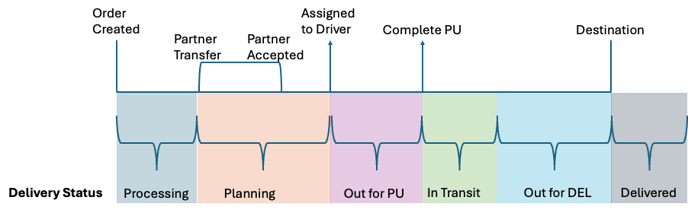
Delivery Status reflects the **real-time execution state** of an order as it progresses through pickup, transit, and delivery.
Unlike Planning Status, Delivery Status is **automatically derived from operational data**, including:
- Tasks
- Journey legs
- Item Tracking Numbers (ITNs)
- Partner acceptance
- Driver progress
This provides a more accurate representation of **what is happening operationally in the field**.
---
**Delivery Status Values**
The system automatically calculates Delivery Status based on operational conditions.
| Scenario | Delivery Status |
| --- | --- |
| Journey leg not yet assigned or transferred | Processing |
| Assigned journey leg rejected by driver or declined by partner | Processing |
| Assigned leg with some ITNs reported | Processing |
| Assigned but driver has not accepted | Planning |
| Assigned and accepted, no pickups completed | Out for Pick Up |
| At least one pickup completed, next step not destination | In Transit |
| At least one pickup completed | Out for Delivery |
| All destination drop-offs completed | Delivered |
| Transferred but partner has not accepted | Planning |
| Transferred and accepted by partner | Planning |
| Partner driver assigned but not accepted | Planning |
| Transferred with no pickup completed | Out for Pick Up |
| Transferred and pickups started | In Transit |
| Transferred and heading to destination | Out for Delivery |
| All drop-offs completed | Delivered |
| All ITNs cancelled | Cancelled |
---
### **Using Statuses for Filtering**
Both **Planning Status** and **Delivery Status** can be used as filters in:
- Transport Orders Page
- Orders Report
- Order Items Report
This allows teams to quickly locate orders based on planning stage or delivery progress.
Examples:
- Filter **Planning Status = Unassigned** to find orders awaiting allocation.
- Filter **Delivery Status = In Transit** to monitor active deliveries.
---
### **Why Both Statuses Matter**
| Status Type | Purpose |
| --- | --- |
| **Planning Status** | Shows how the order is managed internally by dispatch. |
| **Delivery Status** | Shows the real-world operational progress of the order. |
Using both together provides the **full operational picture**.
Example:
| Planning Status | Delivery Status | Meaning |
| --- | --- | --- |
| Assigned | Out for Delivery | Driver has the job and is delivering. |
| Transferred | In Transit | Partner carrier has accepted and shipment is moving. |
| Completed | Delivered | All tasks are complete. |
---
### **Tips for Dispatch Teams**
- Use **Delivery Status filters** to prioritise orders that are **Out for Delivery** or **In Transit**.
- Use **Planning Status filters** to identify orders needing allocation or partner acceptance.
- Save column presets after enabling Delivery Status for consistent visibility across your team.
- [Quick Start Guides](https://help.yojee.com/tcms/quick-start-guides?hsLang=en)
- [Power Up with Yojee - Training Sessions](https://help.yojee.com/tcms/power-up-with-yojee-training-sessions?hsLang=en)
- [Dispatchers](https://help.yojee.com/tcms/dispatchers?hsLang=en#main-content)
- [Creating Orders](https://help.yojee.com/tcms/dispatchers?hsLang=en#creating-orders)
- [Managing Orders](https://help.yojee.com/tcms/dispatchers?hsLang=en#managing-orders)
- [Dispatching Orders](https://help.yojee.com/tcms/dispatchers?hsLang=en#dispatching-orders)
- [Tracking Orders](https://help.yojee.com/tcms/dispatchers?hsLang=en#tracking-orders)
- [Partners](https://help.yojee.com/tcms/dispatchers?hsLang=en#partners)
- [Network](https://help.yojee.com/tcms/dispatchers?hsLang=en#network)
- [Drivers](https://help.yojee.com/tcms/drivers?hsLang=en)
- [Senders](https://help.yojee.com/tcms/senders?hsLang=en)
- [Partners](https://help.yojee.com/tcms/partners?hsLang=en)
- [Manage](https://help.yojee.com/tcms/manage?hsLang=en#main-content)
- [Account](https://help.yojee.com/tcms/manage?hsLang=en#account)
- [Users](https://help.yojee.com/tcms/manage?hsLang=en#users)
- [Fleet](https://help.yojee.com/tcms/manage?hsLang=en#fleet)
- [Drivers](https://help.yojee.com/tcms/manage?hsLang=en#drivers)
- [Addresses](https://help.yojee.com/tcms/manage?hsLang=en#addresses)
- [Customers](https://help.yojee.com/tcms/manage?hsLang=en#customers)
- [Orders](https://help.yojee.com/tcms/manage?hsLang=en#orders)
- [Planning](https://help.yojee.com/tcms/manage?hsLang=en#planning)
- [Documentation](https://help.yojee.com/tcms/manage?hsLang=en#documentation)
- [Finance](https://help.yojee.com/tcms/manage?hsLang=en#finance)
- [Partners](https://help.yojee.com/tcms/manage?hsLang=en#partners)
- [Analytics](https://help.yojee.com/tcms/analytics?hsLang=en#main-content)
- [Dashboards](https://help.yojee.com/tcms/analytics?hsLang=en#dashboards)
- [Reports](https://help.yojee.com/tcms/analytics?hsLang=en#reports)
- [API Documentation](https://help.yojee.com/tcms/api-documentation?hsLang=en)
- [FAQ and Glossary](https://help.yojee.com/tcms/faq-and-glossary?hsLang=en#main-content)
- [Drivers & Planning](https://help.yojee.com/tcms/faq-and-glossary?hsLang=en#drivers-planning)
- [Glossary](https://help.yojee.com/tcms/faq-and-glossary?hsLang=en#glossary)
- [Reports](https://help.yojee.com/tcms/faq-and-glossary?hsLang=en#reports)
- [Other](https://help.yojee.com/tcms/faq-and-glossary?hsLang=en#other)
- [Release Notes](https://help.yojee.com/tcms/release-notes?hsLang=en#main-content)
- [Release Notes 2026](https://help.yojee.com/tcms/release-notes?hsLang=en#release-notes-2026)
- [Release Notes 2025](https://help.yojee.com/tcms/release-notes?hsLang=en#release-notes-2025)
- [Release Notes 2024](https://help.yojee.com/tcms/release-notes?hsLang=en#release-notes-2024)
- [Release Notes 2023](https://help.yojee.com/tcms/release-notes?hsLang=en#release-notes-2023)
- [Release Notes 2022](https://help.yojee.com/tcms/release-notes?hsLang=en#release-notes-2022)
- [Release Notes 2021](https://help.yojee.com/tcms/release-notes?hsLang=en#release-notes-2021)
- [Release Notes 2020](https://help.yojee.com/tcms/release-notes?hsLang=en#release-notes-2020)
- [New Starter Training](https://help.yojee.com/tcms/new-starter-training?hsLang=en#main-content)
- [Level 1](https://help.yojee.com/tcms/new-starter-training?hsLang=en#level-1)
[](https://www.yojee.com)
TCMS Knowledge Base
[mailto:support@yojee.com](mailto:support@yojee.com)
Copyright © 2026 Yojee Pte Ltd