---
title: Special Actions – Autocomplete and Auto-Complete Preceding Legs
description: Learn how to configure Special Actions in Yojee TCMS to automatically complete tasks and preceding legs. Includes setup steps for Autocomplete Dropoff, Complete Preceding Legs, and Complete Preceding at Destination to streamline multi-leg order management.
---
[Skip to content](https://help.yojee.com/tcms/special-actions#main-content)
English
Show submenu for translations

- Knowledge Base
Open main navigation
Close main navigation
- Knowledge Base
- English
Show submenu for translations
- [Go to yojee.com](https://www.yojee.com/)
[Go to yojee.com](https://www.yojee.com/)
Hello. How can we help you?
- There are no suggestions because the search field is empty.
1. [TCMS](https://help.yojee.com/tcms?hsLang=en)
2. [Manage](https://help.yojee.com/tcms/manage?hsLang=en)
3. [Orders](https://help.yojee.com/tcms/manage?hsLang=en#orders)
# Special Actions – Autocomplete and Auto-Complete Preceding Legs
## Automate task and leg completion to improve operational accuracy and reduce manual work.
#### **Overview**
The **Special Actions** in Yojee TCMS allow you to automate the completion of tasks and legs within an order.
These actions are especially useful in **multi-leg movements** or **multi-branch operations**, where preceding legs can remain open after subsequent legs begin.
By automating this process, dispatchers can ensure cleaner reporting, improved data accuracy, and reduced manual follow-up.
---
#### **How to Set Up Special Actions**
To configure these automations:
1. Navigate to **Manage** (via the profile menu in the top-right corner).
2. Select **Orders → Service Types**.
3. Either **create a new** or **edit an existing** Service Type.
4. Scroll down to the **Special Actions** section.
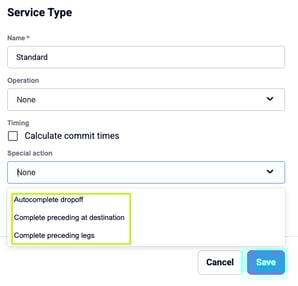
You’ll find three available automation options:
### **1. Autocomplete Dropoff**
Automatically completes the **drop-off task** after the related **pickup task** is completed.
> Use this for **single-task movements** where the delivery completion immediately follows pickup.
### **2. Complete Preceding Legs**
When a subsequent leg begins (e.g., pickup completed on the next leg), all earlier legs are automatically marked as completed.
> Ideal for **internal transfers or multi-branch cargo movements**, ensuring previous legs don’t remain open once the next journey starts.
### **3. Complete Preceding at Destination**
When a **destination leg (drop-off)** is completed, all preceding legs are automatically completed.
> Note: **Empty container return (MT)** legs are excluded and must be completed manually.
Once you’ve selected the desired toggle(s), click **Save** to apply your changes.
---
#### **How It Works**
After configuration, TCMS automatically handles task completion based on your selected setting:
| **Setting** | **Trigger Event** | **Action** | **Use Case / Notes** |
| --- | --- | --- | --- |
| **Autocomplete Dropoff** | When a pickup task is completed | Automatically completes the linked drop-off task | Simplifies single-pickup/single-drop orders |
| **Complete Preceding Legs** | When a subsequent leg starts (pickup completed) | Marks all earlier legs as completed | Keeps reporting clean and reduces manual closures |
| **Complete Preceding at Destination** | When the final destination leg is completed | Completes all preceding legs | MT/empty return legs remain open |
### Additional Details
- **Timestamps:** Automatically completed tasks are assigned timestamps 10 seconds earlier than the subsequent task for chronological accuracy.
- **Reports & APIs:** Auto-completed tasks behave like standard manual completions—reflected normally in all reports and data exports.
- **Exclusions:** MT (empty return) legs are excluded when using *Complete Preceding at Destination*.
---
#### **Use Cases**
These automation options are best suited for:
- **Single-task deliveries**, where pickup completion implies drop-off completion.
- **Multi-branch or inter-depot cargo transfers**, ensuring prior legs close automatically.
- **Full Container Load (FCL) operations**, simplifying multi-leg order management.
- **High-volume dispatch environments**, reducing repetitive manual leg updates.
Enabling these automations helps maintain **data integrity**, improve **reporting accuracy**, and minimise **manual intervention** in day-to-day logistics workflows.
- [Quick Start Guides](https://help.yojee.com/tcms/quick-start-guides?hsLang=en)
- [Power Up with Yojee - Training Sessions](https://help.yojee.com/tcms/power-up-with-yojee-training-sessions?hsLang=en)
- [Dispatchers](https://help.yojee.com/tcms/dispatchers?hsLang=en#main-content)
- [Creating Orders](https://help.yojee.com/tcms/dispatchers?hsLang=en#creating-orders)
- [Managing Orders](https://help.yojee.com/tcms/dispatchers?hsLang=en#managing-orders)
- [Dispatching Orders](https://help.yojee.com/tcms/dispatchers?hsLang=en#dispatching-orders)
- [Tracking Orders](https://help.yojee.com/tcms/dispatchers?hsLang=en#tracking-orders)
- [Partners](https://help.yojee.com/tcms/dispatchers?hsLang=en#partners)
- [Network](https://help.yojee.com/tcms/dispatchers?hsLang=en#network)
- [Drivers](https://help.yojee.com/tcms/drivers?hsLang=en)
- [Senders](https://help.yojee.com/tcms/senders?hsLang=en)
- [Partners](https://help.yojee.com/tcms/partners?hsLang=en)
- [Manage](https://help.yojee.com/tcms/manage?hsLang=en#main-content)
- [Account](https://help.yojee.com/tcms/manage?hsLang=en#account)
- [Users](https://help.yojee.com/tcms/manage?hsLang=en#users)
- [Fleet](https://help.yojee.com/tcms/manage?hsLang=en#fleet)
- [Drivers](https://help.yojee.com/tcms/manage?hsLang=en#drivers)
- [Addresses](https://help.yojee.com/tcms/manage?hsLang=en#addresses)
- [Customers](https://help.yojee.com/tcms/manage?hsLang=en#customers)
- [Orders](https://help.yojee.com/tcms/manage?hsLang=en#orders)
- [Planning](https://help.yojee.com/tcms/manage?hsLang=en#planning)
- [Documentation](https://help.yojee.com/tcms/manage?hsLang=en#documentation)
- [Finance](https://help.yojee.com/tcms/manage?hsLang=en#finance)
- [Partners](https://help.yojee.com/tcms/manage?hsLang=en#partners)
- [Analytics](https://help.yojee.com/tcms/analytics?hsLang=en#main-content)
- [Dashboards](https://help.yojee.com/tcms/analytics?hsLang=en#dashboards)
- [Reports](https://help.yojee.com/tcms/analytics?hsLang=en#reports)
- [API Documentation](https://help.yojee.com/tcms/api-documentation?hsLang=en)
- [FAQ and Glossary](https://help.yojee.com/tcms/faq-and-glossary?hsLang=en#main-content)
- [Drivers & Planning](https://help.yojee.com/tcms/faq-and-glossary?hsLang=en#drivers-planning)
- [Glossary](https://help.yojee.com/tcms/faq-and-glossary?hsLang=en#glossary)
- [Reports](https://help.yojee.com/tcms/faq-and-glossary?hsLang=en#reports)
- [Other](https://help.yojee.com/tcms/faq-and-glossary?hsLang=en#other)
- [Release Notes](https://help.yojee.com/tcms/release-notes?hsLang=en#main-content)
- [Release Notes 2026](https://help.yojee.com/tcms/release-notes?hsLang=en#release-notes-2026)
- [Release Notes 2025](https://help.yojee.com/tcms/release-notes?hsLang=en#release-notes-2025)
- [Release Notes 2024](https://help.yojee.com/tcms/release-notes?hsLang=en#release-notes-2024)
- [Release Notes 2023](https://help.yojee.com/tcms/release-notes?hsLang=en#release-notes-2023)
- [Release Notes 2022](https://help.yojee.com/tcms/release-notes?hsLang=en#release-notes-2022)
- [Release Notes 2021](https://help.yojee.com/tcms/release-notes?hsLang=en#release-notes-2021)
- [Release Notes 2020](https://help.yojee.com/tcms/release-notes?hsLang=en#release-notes-2020)
- [New Starter Training](https://help.yojee.com/tcms/new-starter-training?hsLang=en#main-content)
- [Level 1](https://help.yojee.com/tcms/new-starter-training?hsLang=en#level-1)
[](https://www.yojee.com)
TCMS Knowledge Base
[mailto:support@yojee.com](mailto:support@yojee.com)
Copyright © 2026 Yojee Pte Ltd