---
title: Release Notes October 2024
description: Discover the latest Yojee updates in the October 2024 Release Notes! Learn about Task Notes for clearer driver communication, the new 'Return Order' function, and improved External Order ID visibility. Explore enhanced date range filters, streamlined service types per sender, and redesigned mobile 'Report' buttons. Plus, download driver photos effortlessly. Stay informed with these exciting enhancements!
---
[Skip to content](https://help.yojee.com/tcms/release-notes-october-2024#main-content)
English
Show submenu for translations

- Knowledge Base
Open main navigation
Close main navigation
- Knowledge Base
- English
Show submenu for translations
- [Go to yojee.com](https://www.yojee.com/)
[Go to yojee.com](https://www.yojee.com/)
Hello. How can we help you?
- There are no suggestions because the search field is empty.
1. [TCMS](https://help.yojee.com/tcms?hsLang=en)
2. [Release Notes](https://help.yojee.com/tcms/release-notes?hsLang=en)
3. [Release Notes 2024](https://help.yojee.com/tcms/release-notes?hsLang=en#release-notes-2024)
# Release Notes October 2024
#### **NEW! Task Notes 📝**
**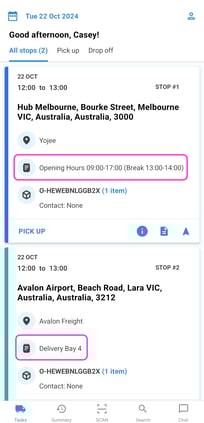**
When managing tasks, it’s essential to provide the driver with critical information for successful completion, such as pre-arrival phone call reminders, venue hours, loading bay details, and specific instructions. Use Task Notes to input these details for clear visibility in the Yojee Driver App.
Learn how to create task notes [here](https://help.yojee.com/knowledge/driver-task-notifications?hsLang=en).
#### **NEW! Create Return 📬**
**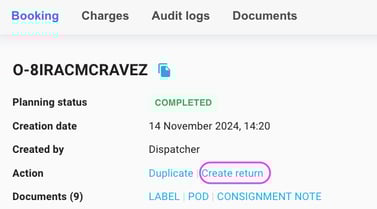**
If an order is rejected, use the 'Return Order' function to create a new order and generate return tasks. See [here](https://help.yojee.com/knowledge/create-a-return-order?hsLang=en) more more information.
#### **IMPROVED**✅
- **External Order IDs on Incoming Order table**
Downstream partners can now view the External Order ID in their incoming order list, providing them with additional information to make quicker and more informed decisions regarding order acceptance.
- **Date Range Update & Timing
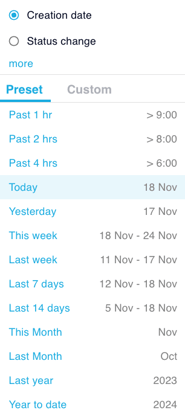**
The date range filters have been enhanced to include more flexible timing options, such as "past 2 hours," enabling dispatchers to stay informed about the latest updates and changes.
- **Photos as Documents
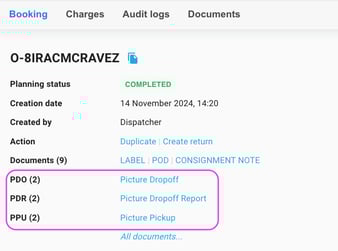**
Effortlessly download driver photos directly from the order page with the newly introduced quick links. For further details on how to download driver photos, click [here](https://help.yojee.com/knowledge/download-driver-photos?hsLang=en).
- **Service type per sender**
Designate particular senders who are permitted to access specific service types. This feature streamlines the selection process by presenting a consolidated list of available services, ensuring that senders only see the services relevant to them. See [here](https://help.yojee.com/knowledge/service-types?hsLang=en) for more information.
- **Mobile 'Report' Button redesign
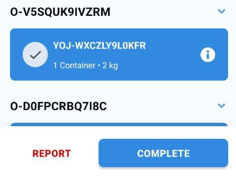**
The Report button in the driver app has been revamped for improved clarity, allowing users to easily differentiate between standard workflow tasks and exception cases.
- [Quick Start Guides](https://help.yojee.com/tcms/quick-start-guides?hsLang=en)
- [Power Up with Yojee - Training Sessions](https://help.yojee.com/tcms/power-up-with-yojee-training-sessions?hsLang=en)
- [Dispatchers](https://help.yojee.com/tcms/dispatchers?hsLang=en#main-content)
- [Creating Orders](https://help.yojee.com/tcms/dispatchers?hsLang=en#creating-orders)
- [Managing Orders](https://help.yojee.com/tcms/dispatchers?hsLang=en#managing-orders)
- [Dispatching Orders](https://help.yojee.com/tcms/dispatchers?hsLang=en#dispatching-orders)
- [Tracking Orders](https://help.yojee.com/tcms/dispatchers?hsLang=en#tracking-orders)
- [Partners](https://help.yojee.com/tcms/dispatchers?hsLang=en#partners)
- [Network](https://help.yojee.com/tcms/dispatchers?hsLang=en#network)
- [Drivers](https://help.yojee.com/tcms/drivers?hsLang=en)
- [Senders](https://help.yojee.com/tcms/senders?hsLang=en)
- [Partners](https://help.yojee.com/tcms/partners?hsLang=en)
- [Manage](https://help.yojee.com/tcms/manage?hsLang=en#main-content)
- [Account](https://help.yojee.com/tcms/manage?hsLang=en#account)
- [Users](https://help.yojee.com/tcms/manage?hsLang=en#users)
- [Fleet](https://help.yojee.com/tcms/manage?hsLang=en#fleet)
- [Drivers](https://help.yojee.com/tcms/manage?hsLang=en#drivers)
- [Addresses](https://help.yojee.com/tcms/manage?hsLang=en#addresses)
- [Customers](https://help.yojee.com/tcms/manage?hsLang=en#customers)
- [Orders](https://help.yojee.com/tcms/manage?hsLang=en#orders)
- [Planning](https://help.yojee.com/tcms/manage?hsLang=en#planning)
- [Documentation](https://help.yojee.com/tcms/manage?hsLang=en#documentation)
- [Finance](https://help.yojee.com/tcms/manage?hsLang=en#finance)
- [Partners](https://help.yojee.com/tcms/manage?hsLang=en#partners)
- [Analytics](https://help.yojee.com/tcms/analytics?hsLang=en#main-content)
- [Dashboards](https://help.yojee.com/tcms/analytics?hsLang=en#dashboards)
- [Reports](https://help.yojee.com/tcms/analytics?hsLang=en#reports)
- [API Documentation](https://help.yojee.com/tcms/api-documentation?hsLang=en)
- [FAQ and Glossary](https://help.yojee.com/tcms/faq-and-glossary?hsLang=en#main-content)
- [Drivers & Planning](https://help.yojee.com/tcms/faq-and-glossary?hsLang=en#drivers-planning)
- [Glossary](https://help.yojee.com/tcms/faq-and-glossary?hsLang=en#glossary)
- [Reports](https://help.yojee.com/tcms/faq-and-glossary?hsLang=en#reports)
- [Other](https://help.yojee.com/tcms/faq-and-glossary?hsLang=en#other)
- [Release Notes](https://help.yojee.com/tcms/release-notes?hsLang=en#main-content)
- [Release Notes 2026](https://help.yojee.com/tcms/release-notes?hsLang=en#release-notes-2026)
- [Release Notes 2025](https://help.yojee.com/tcms/release-notes?hsLang=en#release-notes-2025)
- [Release Notes 2024](https://help.yojee.com/tcms/release-notes?hsLang=en#release-notes-2024)
- [Release Notes 2023](https://help.yojee.com/tcms/release-notes?hsLang=en#release-notes-2023)
- [Release Notes 2022](https://help.yojee.com/tcms/release-notes?hsLang=en#release-notes-2022)
- [Release Notes 2021](https://help.yojee.com/tcms/release-notes?hsLang=en#release-notes-2021)
- [Release Notes 2020](https://help.yojee.com/tcms/release-notes?hsLang=en#release-notes-2020)
- [New Starter Training](https://help.yojee.com/tcms/new-starter-training?hsLang=en#main-content)
- [Level 1](https://help.yojee.com/tcms/new-starter-training?hsLang=en#level-1)
[](https://www.yojee.com)
TCMS Knowledge Base
[mailto:support@yojee.com](mailto:support@yojee.com)
Copyright © 2026 Yojee Pte Ltd