---
title: Partner Driver Location
description: Enabling the location of a carrier driver can provide you with the ability to view their current location.
---
[Skip to content](https://help.yojee.com/tcms/partner-driver-location#main-content)
English
Show submenu for translations

- Knowledge Base
Open main navigation
Close main navigation
- Knowledge Base
- English
Show submenu for translations
- [Go to yojee.com](https://www.yojee.com/)
[Go to yojee.com](https://www.yojee.com/)
Hello. How can we help you?
- There are no suggestions because the search field is empty.
1. [TCMS](https://help.yojee.com/tcms?hsLang=en)
2. [Dispatchers](https://help.yojee.com/tcms/dispatchers?hsLang=en)
3. [Partners](https://help.yojee.com/tcms/dispatchers?hsLang=en#partners)
# Partner Driver Location
## Enabling the location of a carrier driver can provide you with the ability to view their current location.
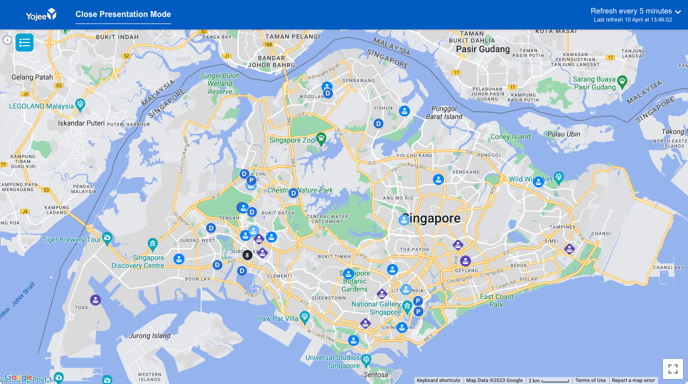
As the delivery allocator, you can view deliveries through carriers to track their driver's location through Yojee's Explore view. This feature provides you with real-time visibility into the status of customer deliveries, allowing you to proactively address any issues or delays that may arise.
Carrier drivers are identifiable in the Explore View map by the purple diamond driver icon  .
****
### **To manage the carrier driver location status:**
Navigate to the '**Partners**' icon in the left-hand navigation menu.
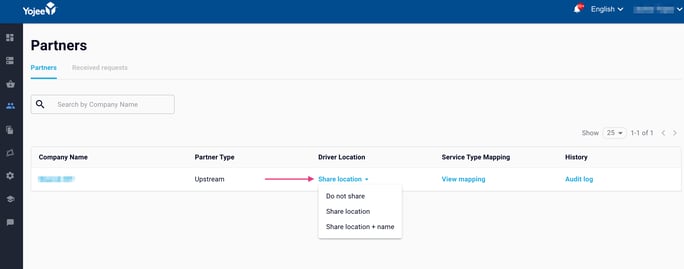
From here, your partners, and relationship (Partner Type) will be listed.
#### **Partner Type - *Upstream, Bidirectional***
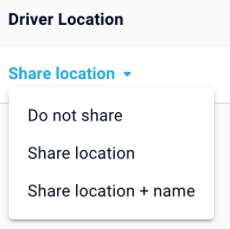
A carrier can only choose to allow the sharing of their drivers with their upstream partners. Under 'Share Driver Location' you will have the ability to select:
| **Status** | **Description** |
| --- | --- |
| **Share Location + Name** | *Driver location and Driver Name is shared with all upstream partners. The location shared if a driver has an active order (not completed or cancelled), from your slug, assigned to them.* |
| **Share Location** | *Driver location is shared with all upstream partners. The location shared if a driver has an active order (not completed or cancelled), from your slug, assigned to them.* |
| **Do Not Share** | *Driver location will not be shared with the upstream partner* |
#### Partner Type - *Downstream*
As an upstream partner, you will have the ability to view the share status of your carrier.
| **Status** | **Description** |
| --- | --- |
| **No, not sharing** | *Carrier 'Share Driver Location' option Toggle Off. Carrier has chosen not to share the driver's location.* |
| **Yes, sharing** | *Carrier 'Share Driver Location' option Toggle On. Delivery will be visible while active and assigned to a carrier driver* |
---
### New Partner Invitations
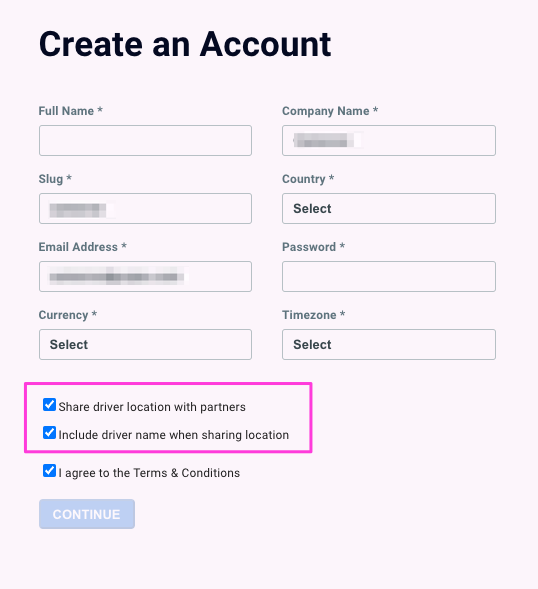
Partners, upon receiving the invitation to become a delivery partner, have the option to opt in to this feature.
On the 'Create An Account' page, there is an option to 'Share driver location with partners' and 'Include driver name when sharing location' before accepting terms and conditions and creating the account.
For more information on signing up partners, see [Downstream Partner Sign Up (Invite Only)](https://help.yojee.com/knowledge/downstream-partner-sign-up?hsLang=en).
- [Quick Start Guides](https://help.yojee.com/tcms/quick-start-guides?hsLang=en)
- [Power Up with Yojee - Training Sessions](https://help.yojee.com/tcms/power-up-with-yojee-training-sessions?hsLang=en)
- [Dispatchers](https://help.yojee.com/tcms/dispatchers?hsLang=en#main-content)
- [Creating Orders](https://help.yojee.com/tcms/dispatchers?hsLang=en#creating-orders)
- [Managing Orders](https://help.yojee.com/tcms/dispatchers?hsLang=en#managing-orders)
- [Dispatching Orders](https://help.yojee.com/tcms/dispatchers?hsLang=en#dispatching-orders)
- [Tracking Orders](https://help.yojee.com/tcms/dispatchers?hsLang=en#tracking-orders)
- [Partners](https://help.yojee.com/tcms/dispatchers?hsLang=en#partners)
- [Network](https://help.yojee.com/tcms/dispatchers?hsLang=en#network)
- [Drivers](https://help.yojee.com/tcms/drivers?hsLang=en)
- [Senders](https://help.yojee.com/tcms/senders?hsLang=en)
- [Partners](https://help.yojee.com/tcms/partners?hsLang=en)
- [Manage](https://help.yojee.com/tcms/manage?hsLang=en#main-content)
- [Account](https://help.yojee.com/tcms/manage?hsLang=en#account)
- [Users](https://help.yojee.com/tcms/manage?hsLang=en#users)
- [Fleet](https://help.yojee.com/tcms/manage?hsLang=en#fleet)
- [Drivers](https://help.yojee.com/tcms/manage?hsLang=en#drivers)
- [Addresses](https://help.yojee.com/tcms/manage?hsLang=en#addresses)
- [Customers](https://help.yojee.com/tcms/manage?hsLang=en#customers)
- [Orders](https://help.yojee.com/tcms/manage?hsLang=en#orders)
- [Planning](https://help.yojee.com/tcms/manage?hsLang=en#planning)
- [Documentation](https://help.yojee.com/tcms/manage?hsLang=en#documentation)
- [Finance](https://help.yojee.com/tcms/manage?hsLang=en#finance)
- [Partners](https://help.yojee.com/tcms/manage?hsLang=en#partners)
- [Analytics](https://help.yojee.com/tcms/analytics?hsLang=en#main-content)
- [Dashboards](https://help.yojee.com/tcms/analytics?hsLang=en#dashboards)
- [Reports](https://help.yojee.com/tcms/analytics?hsLang=en#reports)
- [API Documentation](https://help.yojee.com/tcms/api-documentation?hsLang=en)
- [FAQ and Glossary](https://help.yojee.com/tcms/faq-and-glossary?hsLang=en#main-content)
- [Drivers & Planning](https://help.yojee.com/tcms/faq-and-glossary?hsLang=en#drivers-planning)
- [Glossary](https://help.yojee.com/tcms/faq-and-glossary?hsLang=en#glossary)
- [Reports](https://help.yojee.com/tcms/faq-and-glossary?hsLang=en#reports)
- [Other](https://help.yojee.com/tcms/faq-and-glossary?hsLang=en#other)
- [Release Notes](https://help.yojee.com/tcms/release-notes?hsLang=en#main-content)
- [Release Notes 2026](https://help.yojee.com/tcms/release-notes?hsLang=en#release-notes-2026)
- [Release Notes 2025](https://help.yojee.com/tcms/release-notes?hsLang=en#release-notes-2025)
- [Release Notes 2024](https://help.yojee.com/tcms/release-notes?hsLang=en#release-notes-2024)
- [Release Notes 2023](https://help.yojee.com/tcms/release-notes?hsLang=en#release-notes-2023)
- [Release Notes 2022](https://help.yojee.com/tcms/release-notes?hsLang=en#release-notes-2022)
- [Release Notes 2021](https://help.yojee.com/tcms/release-notes?hsLang=en#release-notes-2021)
- [Release Notes 2020](https://help.yojee.com/tcms/release-notes?hsLang=en#release-notes-2020)
- [New Starter Training](https://help.yojee.com/tcms/new-starter-training?hsLang=en#main-content)
- [Level 1](https://help.yojee.com/tcms/new-starter-training?hsLang=en#level-1)
[](https://www.yojee.com)
TCMS Knowledge Base
[mailto:support@yojee.com](mailto:support@yojee.com)
Copyright © 2026 Yojee Pte Ltd