---
title: Organisational Units
description: How to setup and rename Organisational Units in Yojee
---
[Skip to content](https://help.yojee.com/tcms/organisational-units#main-content)
English
Show submenu for translations

- Knowledge Base
Open main navigation
Close main navigation
- Knowledge Base
- English
Show submenu for translations
- [Go to yojee.com](https://www.yojee.com/)
[Go to yojee.com](https://www.yojee.com/)
Hello. How can we help you?
- There are no suggestions because the search field is empty.
1. [TCMS](https://help.yojee.com/tcms?hsLang=en)
2. [Manage](https://help.yojee.com/tcms/manage?hsLang=en)
3. [Users](https://help.yojee.com/tcms/manage?hsLang=en#users)
# Organisational Units
## How to setup and rename Organisational Units in Yojee
Organisational Units enable different departments/teams/regions within an organisation to effectively use the Yojee platform, while ensuring that users only see orders that are relevant to their specific unit or their designated access level.
To create Organisational Units with Yojee, you must complete the following:
1. [Create Organisational Units](https://help.yojee.com/tcms/organisational-units#Create-OU)
2. [Assign Organisational Units to User Roles](https://help.yojee.com/tcms/organisational-units#User-Roles)
3. [Update Order Template to include Organisational Unit](https://help.yojee.com/tcms/organisational-units#Order-Template)
You can easily rename 'Organisational unit' to something more familiar to your organisation (i.e. Mill, Region, Department, etc). To rename see [Custom Labels](https://help.yojee.com/knowledge/custom-labels?hsLang=en).
### Creating Organisational Units
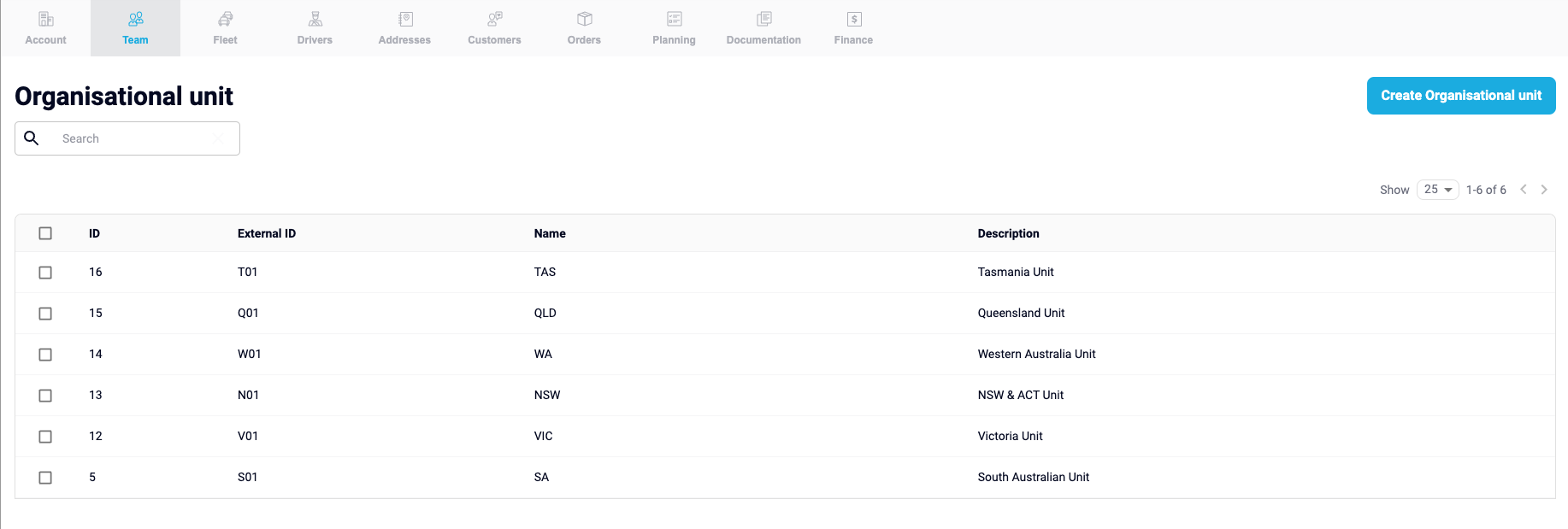
1. From the Manage section, navigate to **Team \> Organisational unit**
2. Select **Create Organisational unit** in the top right
3. Enter the Organisational unit **Name** and any additional detail
*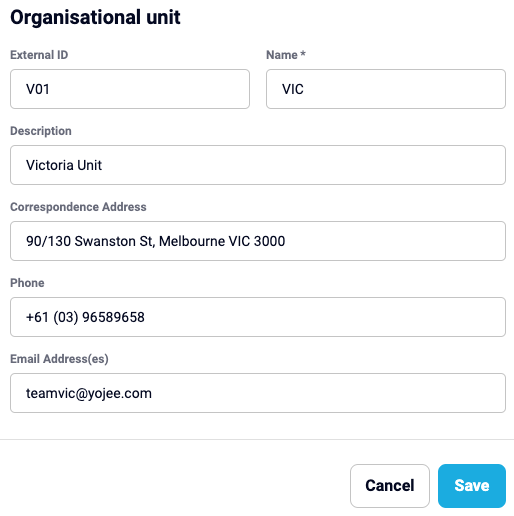*
4. Select **Save**
You have now created an organisational unit, repeat this to create all the required Operational Units
### Creating Operational unit User Roles
Once organisational units have been setup, roles can be created for users to be assigned to.
For more information on creating roles, see [User Roles](https://help.yojee.com/knowledge/user-roles?hsLang=en).
In **Manage**, navigate to **Team \> Roles**
Here, you can edit an existing, or create new user roles ensuring Organisational Units are assigned to specific roles.
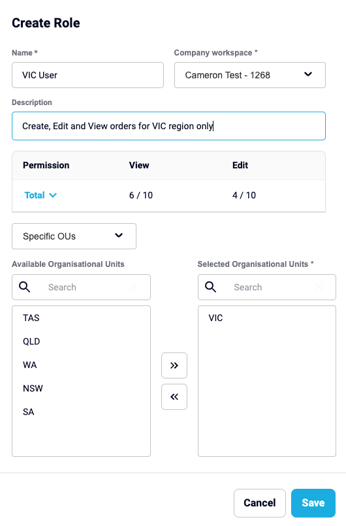
After your user roles have been created, they must be assigned to user. See [Adding a New Dispatch User](https://help.yojee.com/knowledge/add-a-new-user?hsLang=en) in Yojee for information how to create users.
### Order Templates
For information on how to create order templates, see [Order Templates](https://help.yojee.com/knowledge/templates?hsLang=en).
Within the order template, the Organisational Unit will need to be select to either **Available** option to ensure they can both view and create orders.
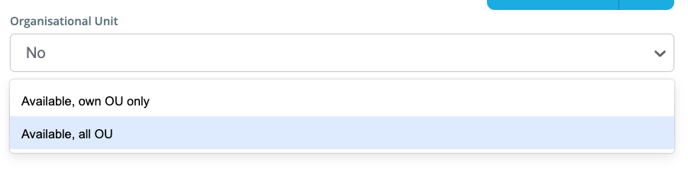
- **Available, own OU only** - User is able to create/assign orders specific to the Organisational Units their user role gives them access to
- **Available, all** **OU** - User can create/assign orders to all Organisational Units
- [Quick Start Guides](https://help.yojee.com/tcms/quick-start-guides?hsLang=en)
- [Power Up with Yojee - Training Sessions](https://help.yojee.com/tcms/power-up-with-yojee-training-sessions?hsLang=en)
- [Dispatchers](https://help.yojee.com/tcms/dispatchers?hsLang=en#main-content)
- [Creating Orders](https://help.yojee.com/tcms/dispatchers?hsLang=en#creating-orders)
- [Managing Orders](https://help.yojee.com/tcms/dispatchers?hsLang=en#managing-orders)
- [Dispatching Orders](https://help.yojee.com/tcms/dispatchers?hsLang=en#dispatching-orders)
- [Tracking Orders](https://help.yojee.com/tcms/dispatchers?hsLang=en#tracking-orders)
- [Partners](https://help.yojee.com/tcms/dispatchers?hsLang=en#partners)
- [Network](https://help.yojee.com/tcms/dispatchers?hsLang=en#network)
- [Drivers](https://help.yojee.com/tcms/drivers?hsLang=en)
- [Senders](https://help.yojee.com/tcms/senders?hsLang=en)
- [Partners](https://help.yojee.com/tcms/partners?hsLang=en)
- [Manage](https://help.yojee.com/tcms/manage?hsLang=en#main-content)
- [Account](https://help.yojee.com/tcms/manage?hsLang=en#account)
- [Users](https://help.yojee.com/tcms/manage?hsLang=en#users)
- [Fleet](https://help.yojee.com/tcms/manage?hsLang=en#fleet)
- [Drivers](https://help.yojee.com/tcms/manage?hsLang=en#drivers)
- [Addresses](https://help.yojee.com/tcms/manage?hsLang=en#addresses)
- [Customers](https://help.yojee.com/tcms/manage?hsLang=en#customers)
- [Orders](https://help.yojee.com/tcms/manage?hsLang=en#orders)
- [Planning](https://help.yojee.com/tcms/manage?hsLang=en#planning)
- [Documentation](https://help.yojee.com/tcms/manage?hsLang=en#documentation)
- [Finance](https://help.yojee.com/tcms/manage?hsLang=en#finance)
- [Partners](https://help.yojee.com/tcms/manage?hsLang=en#partners)
- [Analytics](https://help.yojee.com/tcms/analytics?hsLang=en#main-content)
- [Dashboards](https://help.yojee.com/tcms/analytics?hsLang=en#dashboards)
- [Reports](https://help.yojee.com/tcms/analytics?hsLang=en#reports)
- [API Documentation](https://help.yojee.com/tcms/api-documentation?hsLang=en)
- [FAQ and Glossary](https://help.yojee.com/tcms/faq-and-glossary?hsLang=en#main-content)
- [Drivers & Planning](https://help.yojee.com/tcms/faq-and-glossary?hsLang=en#drivers-planning)
- [Glossary](https://help.yojee.com/tcms/faq-and-glossary?hsLang=en#glossary)
- [Reports](https://help.yojee.com/tcms/faq-and-glossary?hsLang=en#reports)
- [Other](https://help.yojee.com/tcms/faq-and-glossary?hsLang=en#other)
- [Release Notes](https://help.yojee.com/tcms/release-notes?hsLang=en#main-content)
- [Release Notes 2026](https://help.yojee.com/tcms/release-notes?hsLang=en#release-notes-2026)
- [Release Notes 2025](https://help.yojee.com/tcms/release-notes?hsLang=en#release-notes-2025)
- [Release Notes 2024](https://help.yojee.com/tcms/release-notes?hsLang=en#release-notes-2024)
- [Release Notes 2023](https://help.yojee.com/tcms/release-notes?hsLang=en#release-notes-2023)
- [Release Notes 2022](https://help.yojee.com/tcms/release-notes?hsLang=en#release-notes-2022)
- [Release Notes 2021](https://help.yojee.com/tcms/release-notes?hsLang=en#release-notes-2021)
- [Release Notes 2020](https://help.yojee.com/tcms/release-notes?hsLang=en#release-notes-2020)
- [New Starter Training](https://help.yojee.com/tcms/new-starter-training?hsLang=en#main-content)
- [Level 1](https://help.yojee.com/tcms/new-starter-training?hsLang=en#level-1)
[](https://www.yojee.com)
TCMS Knowledge Base
[mailto:support@yojee.com](mailto:support@yojee.com)
Copyright © 2026 Yojee Pte Ltd