---
title: Driver App - Login and Settings
description: "The Yojee Driver App provides drivers with features such as delivery information, turn-by-turn navigation, ePOD collection, and efficient job completion marking. \nThis delivery app is available in both Android and iOS versions."
---
[Skip to content](https://help.yojee.com/tcms/driver-app-1#main-content)
English
Show submenu for translations

- Knowledge Base
Open main navigation
Close main navigation
- Knowledge Base
- English
Show submenu for translations
- [Go to yojee.com](https://www.yojee.com/)
[Go to yojee.com](https://www.yojee.com/)
Hello. How can we help you?
- There are no suggestions because the search field is empty.
1. [TCMS](https://help.yojee.com/tcms?hsLang=en)
2. [Drivers](https://help.yojee.com/tcms/drivers?hsLang=en)
# Driver App - Login and Settings
## The Yojee Driver App provides drivers with features such as delivery information, turn-by-turn navigation, ePOD collection, and efficient job completion marking. This delivery app is available in both Android and iOS versions.
### Log in to Yojee Driver App
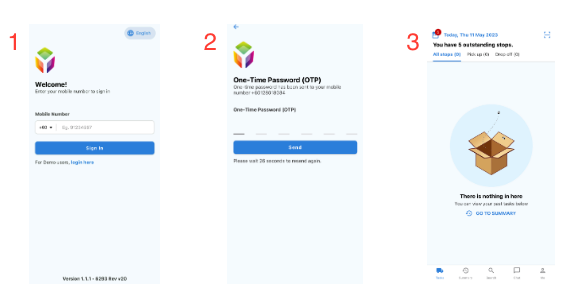
Step 1: Enter your valid mobile number to Sign in. **(*You must be registered by the dispatcher before you can log into the driver app.)***
Step 2: Key in your 6-digit OTP and click the ‘Send' button to continue to the next page. ***(OTP can be obtained either through SMS or provided by the system administrator.)***
Step 3: After the successful OTP verification, you are able to see the tasks dashboard.
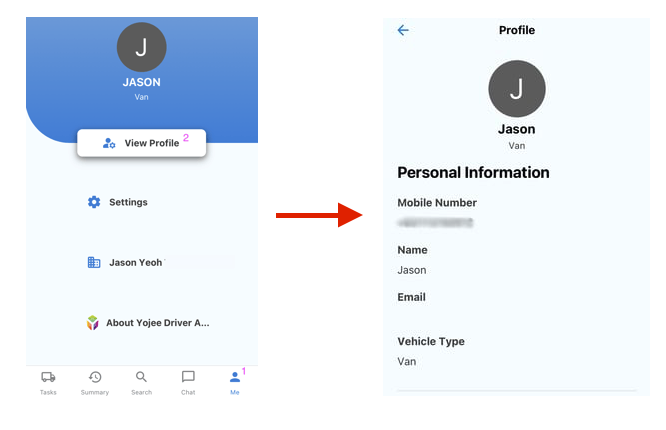
**How to view your personal information?**
1\) Select the **'Me'** icon.
2\) To access your personal information, please click on the **'View profile'** option.
*Note: You are unable to change or edit your personal information in the Yojee Driver App. Please contact your dispatcher for further assistance.*
**
**What I can do in Settings? 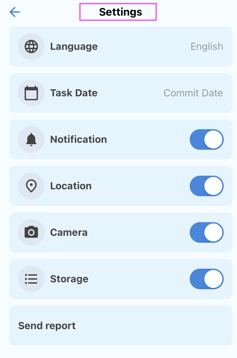**
- Modify the **language** preference of your applications. ***[Click here](https://help.yojee.com/knowledge/change_language_driver_app?hsLang=en)**to know more about how to change the language.*
- You can toggle the permissions for various device features such as **Notification, Camera, Location,** and **Storage**. This means you can choose to either **allow or disallow access** to these features for the apps installed on your device.
- Customize the **task date** either commit or the assigned date.
> **Download your Yojee Driver App Here 👇**
>
> 
>
>
>
> [**Android**](https://play.google.com/store/apps/details?id=com.yojee.driverapp.v3&pli=1)
>
> [**IOS**](https://apps.apple.com/gb/app/yojee-driver-v3/id1625248501)
🚨**Tip**
Driver walkthrough video's can be found [here](https://help.yojee.com/knowledge/yojee-driver-app-walkthrough?hsLang=en).
- [Quick Start Guides](https://help.yojee.com/tcms/quick-start-guides?hsLang=en)
- [Power Up with Yojee - Training Sessions](https://help.yojee.com/tcms/power-up-with-yojee-training-sessions?hsLang=en)
- [Dispatchers](https://help.yojee.com/tcms/dispatchers?hsLang=en#main-content)
- [Creating Orders](https://help.yojee.com/tcms/dispatchers?hsLang=en#creating-orders)
- [Managing Orders](https://help.yojee.com/tcms/dispatchers?hsLang=en#managing-orders)
- [Dispatching Orders](https://help.yojee.com/tcms/dispatchers?hsLang=en#dispatching-orders)
- [Tracking Orders](https://help.yojee.com/tcms/dispatchers?hsLang=en#tracking-orders)
- [Partners](https://help.yojee.com/tcms/dispatchers?hsLang=en#partners)
- [Network](https://help.yojee.com/tcms/dispatchers?hsLang=en#network)
- [Drivers](https://help.yojee.com/tcms/drivers?hsLang=en)
- [Senders](https://help.yojee.com/tcms/senders?hsLang=en)
- [Partners](https://help.yojee.com/tcms/partners?hsLang=en)
- [Manage](https://help.yojee.com/tcms/manage?hsLang=en#main-content)
- [Account](https://help.yojee.com/tcms/manage?hsLang=en#account)
- [Users](https://help.yojee.com/tcms/manage?hsLang=en#users)
- [Fleet](https://help.yojee.com/tcms/manage?hsLang=en#fleet)
- [Drivers](https://help.yojee.com/tcms/manage?hsLang=en#drivers)
- [Addresses](https://help.yojee.com/tcms/manage?hsLang=en#addresses)
- [Customers](https://help.yojee.com/tcms/manage?hsLang=en#customers)
- [Orders](https://help.yojee.com/tcms/manage?hsLang=en#orders)
- [Planning](https://help.yojee.com/tcms/manage?hsLang=en#planning)
- [Documentation](https://help.yojee.com/tcms/manage?hsLang=en#documentation)
- [Finance](https://help.yojee.com/tcms/manage?hsLang=en#finance)
- [Partners](https://help.yojee.com/tcms/manage?hsLang=en#partners)
- [Analytics](https://help.yojee.com/tcms/analytics?hsLang=en#main-content)
- [Dashboards](https://help.yojee.com/tcms/analytics?hsLang=en#dashboards)
- [Reports](https://help.yojee.com/tcms/analytics?hsLang=en#reports)
- [API Documentation](https://help.yojee.com/tcms/api-documentation?hsLang=en)
- [FAQ and Glossary](https://help.yojee.com/tcms/faq-and-glossary?hsLang=en#main-content)
- [Drivers & Planning](https://help.yojee.com/tcms/faq-and-glossary?hsLang=en#drivers-planning)
- [Glossary](https://help.yojee.com/tcms/faq-and-glossary?hsLang=en#glossary)
- [Reports](https://help.yojee.com/tcms/faq-and-glossary?hsLang=en#reports)
- [Other](https://help.yojee.com/tcms/faq-and-glossary?hsLang=en#other)
- [Release Notes](https://help.yojee.com/tcms/release-notes?hsLang=en#main-content)
- [Release Notes 2026](https://help.yojee.com/tcms/release-notes?hsLang=en#release-notes-2026)
- [Release Notes 2025](https://help.yojee.com/tcms/release-notes?hsLang=en#release-notes-2025)
- [Release Notes 2024](https://help.yojee.com/tcms/release-notes?hsLang=en#release-notes-2024)
- [Release Notes 2023](https://help.yojee.com/tcms/release-notes?hsLang=en#release-notes-2023)
- [Release Notes 2022](https://help.yojee.com/tcms/release-notes?hsLang=en#release-notes-2022)
- [Release Notes 2021](https://help.yojee.com/tcms/release-notes?hsLang=en#release-notes-2021)
- [Release Notes 2020](https://help.yojee.com/tcms/release-notes?hsLang=en#release-notes-2020)
- [New Starter Training](https://help.yojee.com/tcms/new-starter-training?hsLang=en#main-content)
- [Level 1](https://help.yojee.com/tcms/new-starter-training?hsLang=en#level-1)
[](https://www.yojee.com)
TCMS Knowledge Base
[mailto:support@yojee.com](mailto:support@yojee.com)
Copyright © 2026 Yojee Pte Ltd