---
title: Share Saved Filters and Column Layouts on the Transport Orders Page
description: Learn how to share a saved filter or column layout on the TCMS Transport Orders page, how colleagues adopt it as their default, and what happens when you edit or stop sharing it.
---
[Skip to content](https://help.yojee.com/knowledge/transport-orders-shared-filters-column-layouts#main-content)
English
Show submenu for translations

- Knowledge Base
Open main navigation
Close main navigation
- Knowledge Base
- English
Show submenu for translations
- [Go to yojee.com](https://www.yojee.com/)
[Go to yojee.com](https://www.yojee.com/)
Hello. How can we help you?
- There are no suggestions because the search field is empty.
1. [Knowledge Base](https://help.yojee.com/knowledge?hsLang=en)
2. [Dispatchers](https://help.yojee.com/knowledge/dispatchers?hsLang=en)
3. [Managing Orders](https://help.yojee.com/knowledge/dispatchers?hsLang=en#managing-orders)
# Share Saved Filters and Column Layouts on the Transport Orders Page
## Set up a view once and share it with your company, so every allocator works from the same filter and columns
### Overview
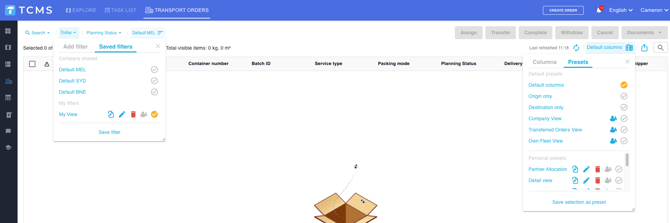
You can now share a **saved filter** or a **column layout** on the Transport Orders page with everyone in your company. Colleagues see it in their own list and choose whether to use it.
This saves each allocator from building the same view by hand, and keeps a team working from one consistent set of orders and columns.
- A **saved filter** controls which orders you see (for example, a set of reference numbers, statuses or dates).
- A **column layout** controls which columns you see and in what order.
---
### Key rules
- **Anyone can share.** You do not need an admin role. This works the same way as sharing on the Reports page.
- **Sharing never changes anyone else's screen.** A shared filter or layout only appears in your colleagues' lists. Nothing applies until they select it.
- **Your own default always wins.** Nobody can set or override your default view for you.
- **Your personal filters and layouts are unaffected.** Anything you have not shared keeps working exactly as before.
---
### Share a saved filter
#### 1. Build and save the filter
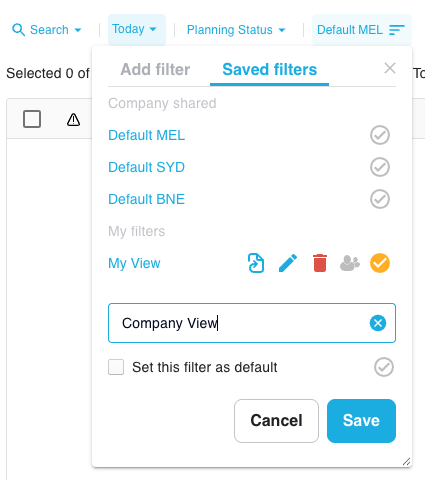
On the Transport Orders page, set up the filter you want, then save it with **Save Filter** as you would today.
### 2. Share it with your company
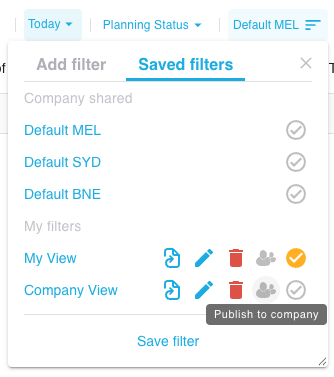
Open your saved filter list, find the filter, and select  **\[Share with company\]**.
#### 3. Let your team know
The filter now appears in your colleagues' filter lists. Tell them its name so they know to look for it.
### If the filter cannot be shared
TCMS checks a filter before sharing it. If the filter contains a search type the system does not support, sharing is refused and a message explains why. Remove that part of the filter and try again.
---
### Share a column layout
#### 1. Set up your columns
Arrange the columns on the Transport Orders page the way you want them, then save the layout.
#### 2. Share it with your company
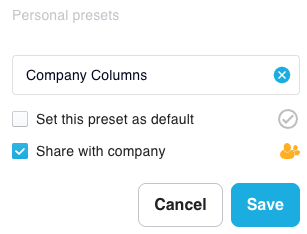
In your list of saved column layouts, select  **\[Share with company\]** on the layout.
---
### Use a filter or layout someone has shared
#### 1. Select it
Open your saved filter list (or column layout list) and select the shared item. It applies straight away to your view.
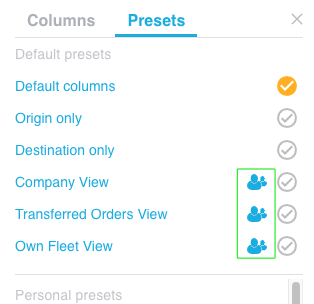
### 2. Make it your default (optional)
To have it apply every time you open the Transport Orders page, set it as your default with  **\[Set as default\]**.
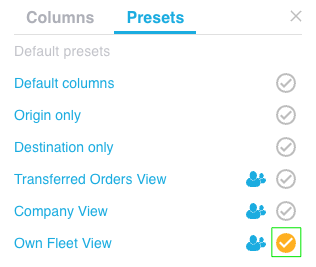
#### 3. Keep your own version (filters only)
Want a variation for yourself? Select the shared filter, change it, and use **Save Filter** to keep a personal copy. Changes to your copy never affect the shared filter or anyone else.
---
### What happens when the person who shared it makes changes
| Change | Saved filter | Column layout |
| --- | --- | --- |
| **The filter or layout is edited** | Everyone using it sees the change the next time they load the Transport Orders page | Everyone who adopted it gets the update the next time they load the Transport Orders page |
| **Sharing is stopped, or it is deleted** | It disappears from colleagues' lists. Anyone who had it as their default goes back to their usual view on next load | It disappears from colleagues' lists. Anyone who was using it goes back to a standard column layout on next load |
---
### Frequently Asked Questions
**Will sharing a filter change what my colleagues see right now?** No. It appears in their list only. Their view changes when they select it.
**Can an admin stop users from sharing?** Not at the moment. Every Transport Orders page user can share. Contact your Customer Success Manager if your team needs tighter control.
**I edited a shared filter by mistake. How do I undo it?** Change the filter back and save it. Colleagues see the corrected version on their next page load.
**Someone stopped sharing a filter I used as my default. What happens?** On your next load, the Transport Orders page opens with your usual view. You will not see an error. Pick another filter and set it as your default if needed.
- [Quick Start Guides](https://help.yojee.com/knowledge/quick-start-guides?hsLang=en)
- [Power Up with Yojee - Training Sessions](https://help.yojee.com/knowledge/power-up-with-yojee-training-sessions?hsLang=en)
- [Dispatchers](https://help.yojee.com/knowledge/dispatchers?hsLang=en#main-content)
- [Creating Orders](https://help.yojee.com/knowledge/dispatchers?hsLang=en#creating-orders)
- [Managing Orders](https://help.yojee.com/knowledge/dispatchers?hsLang=en#managing-orders)
- [Dispatching Orders](https://help.yojee.com/knowledge/dispatchers?hsLang=en#dispatching-orders)
- [Tracking Orders](https://help.yojee.com/knowledge/dispatchers?hsLang=en#tracking-orders)
- [Partners](https://help.yojee.com/knowledge/dispatchers?hsLang=en#partners)
- [Network](https://help.yojee.com/knowledge/dispatchers?hsLang=en#network)
- [Drivers](https://help.yojee.com/knowledge/drivers?hsLang=en)
- [Senders](https://help.yojee.com/knowledge/senders?hsLang=en)
- [Partners](https://help.yojee.com/knowledge/partners?hsLang=en)
- [Manage](https://help.yojee.com/knowledge/manage?hsLang=en#main-content)
- [Account](https://help.yojee.com/knowledge/manage?hsLang=en#account)
- [Users](https://help.yojee.com/knowledge/manage?hsLang=en#users)
- [Fleet](https://help.yojee.com/knowledge/manage?hsLang=en#fleet)
- [Drivers](https://help.yojee.com/knowledge/manage?hsLang=en#drivers)
- [Addresses](https://help.yojee.com/knowledge/manage?hsLang=en#addresses)
- [Customers](https://help.yojee.com/knowledge/manage?hsLang=en#customers)
- [Orders](https://help.yojee.com/knowledge/manage?hsLang=en#orders)
- [Planning](https://help.yojee.com/knowledge/manage?hsLang=en#planning)
- [Documentation](https://help.yojee.com/knowledge/manage?hsLang=en#documentation)
- [Finance](https://help.yojee.com/knowledge/manage?hsLang=en#finance)
- [Partners](https://help.yojee.com/knowledge/manage?hsLang=en#partners)
- [Analytics](https://help.yojee.com/knowledge/analytics?hsLang=en#main-content)
- [Dashboards](https://help.yojee.com/knowledge/analytics?hsLang=en#dashboards)
- [Reports](https://help.yojee.com/knowledge/analytics?hsLang=en#reports)
- [API Documentation](https://help.yojee.com/knowledge/api-documentation?hsLang=en)
- [FAQ and Glossary](https://help.yojee.com/knowledge/faq-and-glossary?hsLang=en#main-content)
- [Drivers & Planning](https://help.yojee.com/knowledge/faq-and-glossary?hsLang=en#drivers-planning)
- [Glossary](https://help.yojee.com/knowledge/faq-and-glossary?hsLang=en#glossary)
- [Reports](https://help.yojee.com/knowledge/faq-and-glossary?hsLang=en#reports)
- [Other](https://help.yojee.com/knowledge/faq-and-glossary?hsLang=en#other)
- [Release Notes](https://help.yojee.com/knowledge/release-notes?hsLang=en#main-content)
- [Release Notes 2026](https://help.yojee.com/knowledge/release-notes?hsLang=en#release-notes-2026)
- [Release Notes 2025](https://help.yojee.com/knowledge/release-notes?hsLang=en#release-notes-2025)
- [Release Notes 2024](https://help.yojee.com/knowledge/release-notes?hsLang=en#release-notes-2024)
- [Release Notes 2023](https://help.yojee.com/knowledge/release-notes?hsLang=en#release-notes-2023)
- [Release Notes 2022](https://help.yojee.com/knowledge/release-notes?hsLang=en#release-notes-2022)
- [Release Notes 2021](https://help.yojee.com/knowledge/release-notes?hsLang=en#release-notes-2021)
- [Release Notes 2020](https://help.yojee.com/knowledge/release-notes?hsLang=en#release-notes-2020)
- [New Starter Training](https://help.yojee.com/knowledge/new-starter-training?hsLang=en#main-content)
- [Level 1](https://help.yojee.com/knowledge/new-starter-training?hsLang=en#level-1)
[](https://www.yojee.com)
TCMS Knowledge Base
[mailto:support@yojee.com](mailto:support@yojee.com)
Copyright © 2026 Yojee Pte Ltd