---
title: "Optimising Routes with Yojee: A Guide to Smart Route Planning"
description: Maximise efficiency with Yojee's optimisation technology. Learn to plan routes, assign tasks, manage vehicle capacity, and troubleshoot common issues for smarter logistics management.
---
[Skip to content](https://help.yojee.com/knowledge/optimise#main-content)
English
Show submenu for translations

- Knowledge Base
Open main navigation
Close main navigation
- Knowledge Base
- English
Show submenu for translations
- [Go to yojee.com](https://www.yojee.com/)
[Go to yojee.com](https://www.yojee.com/)
Hello. How can we help you?
- There are no suggestions because the search field is empty.
1. [Knowledge Base](https://help.yojee.com/knowledge?hsLang=en)
2. [Dispatchers](https://help.yojee.com/knowledge/dispatchers?hsLang=en)
3. [Dispatching Orders](https://help.yojee.com/knowledge/dispatchers?hsLang=en#dispatching-orders)
# Optimising Routes with Yojee: A Guide to Smart Route Planning
## Learn how to use Yojee's optimisation technology for efficient route planning, assigning tasks, and controlling vehicle capacity.
### **Overview**
Yojee’s **Optimiser** provides advanced route planning and task assignment capabilities to improve operational efficiency. This guide covers how to activate optimisation, control its scope, troubleshoot dropped orders, and configure vehicle capacity for optimal results.
---
### **1. Steps to Activate Optimisation**
Optimisation can only be completed in the **Explore View** and **Task List View**.
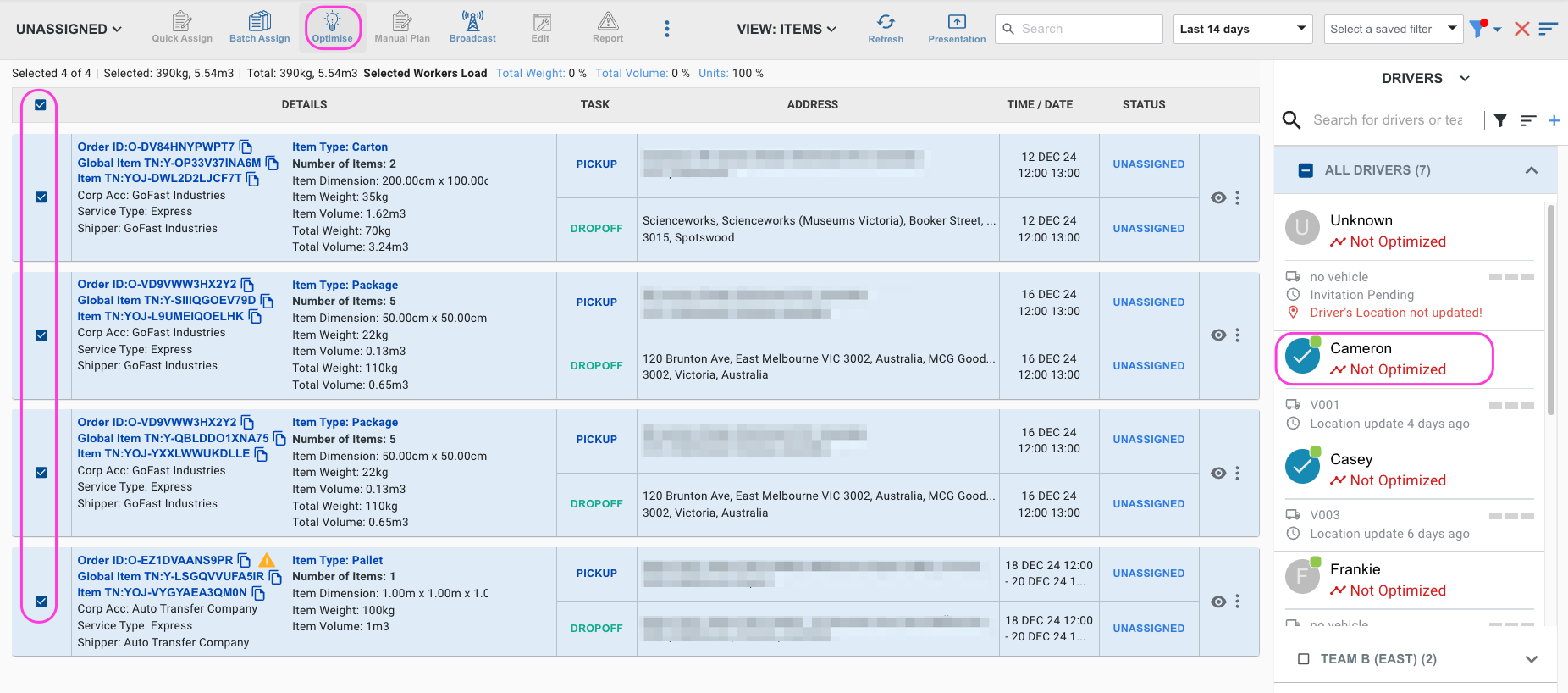
To optimise tasks and assign them to drivers, follow these steps:
1. **Select Tasks**: Use filters to help you narrow down the tasks you want to optimise.
2. **Select Drivers**: Choose one or more drivers for the optimisation process. The drivers will appear in a list to the right of the orders.
3. **Activate Optimisation**: Click the **"Optimise"** button on the ribbon bar.
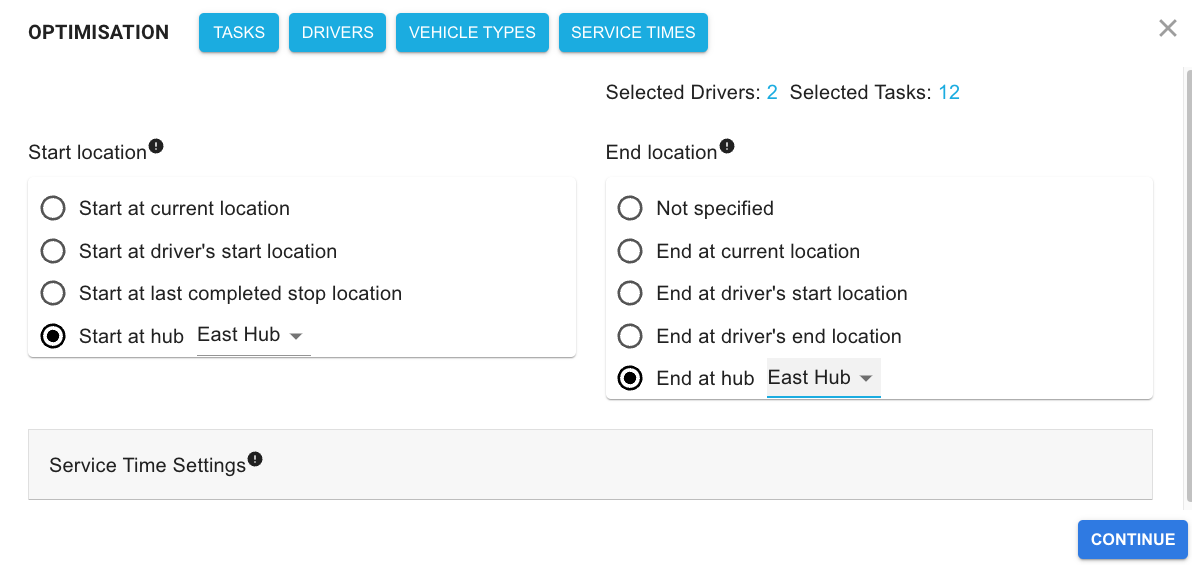
4. **Set Optimisation Parameters**: Specify settings such as start/end locations, service times, then click **"Continue"**.
5. **Review and Assign**:
- Review the suggested routes.
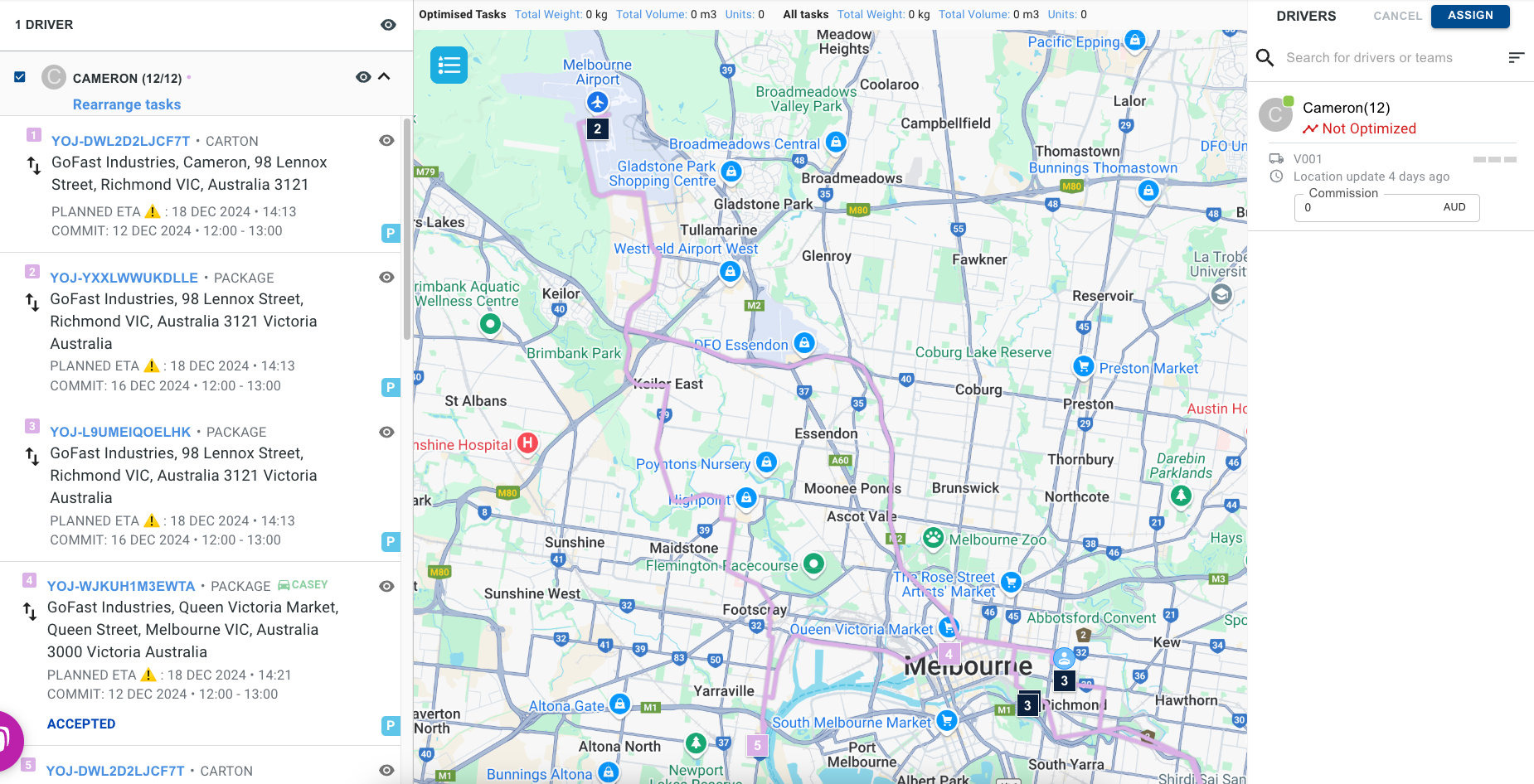
- Click **"Assign"** to confirm and dispatch the tasks to the selected drivers.
---
### **2. Controlling the Scope of Optimisation**
The scope of optimisation is determined by:
- **Selected Drivers**: Drivers chosen in Step 2.
- **Selected Tasks**: Tasks selected in Step 1, plus additional tasks that may be automatically included:
- Existing tasks already assigned to the selected drivers.
- Tasks linked to selected tasks or existing tasks assigned to the drivers.
- **Time Frame**: The timeframe starts from the optimisation time while accounting for the drivers' working schedules.
---
### **3. Troubleshooting Dropped Orders**
If tasks are not included in the optimised plan, it could be due to data issues. Use this checklist to validate your data:
#### **Data Sanity Checklist**
1. **Orders Must Be Feasible**:
- Ensure valid pickup and drop-off addresses with mapped roads.
- If roads are unavailable, disable the **“Use real road distances”** flag to use crow-fly distance.
2. **Time Windows**:
- Verify that task time windows align with the optimisation schedule.
- Update time windows for orders that fall outside the current timeframe.
3. **Driver Availability**:
- Check driver schedules to ensure working hours align with task execution windows.
- Confirm drivers have enough time to complete the assigned tasks.
4. **Service Times**:
- Ensure service times at each location are reasonable for the task execution.
---
### **4. Understanding Penalties and Costs**
Yojee’s optimiser uses an **objective function** to determine the best routing solution. Key metrics include:
- **Drop Penalty**: A penalty applied to tasks not included in the route.
- **Cost Per Kilometre (KM)**: The cost metric to prioritise shorter routes.
#### **Example Objective Function**
The optimiser minimises the total cost C, calculated as:
**C = (W1 x Number of Tasks Dropped) + (W2 x Distance Travelled in KM)**
Where:
- W1 = Drop Penalty
- W2 = Cost per KM
If route costs significantly exceed the drop penalty (e.g., for long distances), fine-tuning the optimiser settings may be necessary.
---
### **5. Controlling Vehicle Capacity**
To ensure tasks respect vehicle capacity limits:
1. Go to **Manage \> Vehicle Management \> Fleet Management**.
2. Set capacity limits (e.g., weight, volume) for each vehicle type.
3. Assign the appropriate vehicle type to drivers.
The optimiser will consider these capacity limits when creating routes.
---
### **Key Takeaways**
- **Optimisation can only be performed in the Explore View and Task List View.**
- Troubleshoot dropped tasks with the **data sanity checklist**.
- Adjust vehicle capacity settings to ensure compliance with load limits.
- Optimise for the most efficient and cost-effective routes using penalties and metrics.
- [Quick Start Guides](https://help.yojee.com/knowledge/quick-start-guides?hsLang=en)
- [Power Up with Yojee - Training Sessions](https://help.yojee.com/knowledge/power-up-with-yojee-training-sessions?hsLang=en)
- [Dispatchers](https://help.yojee.com/knowledge/dispatchers?hsLang=en#main-content)
- [Creating Orders](https://help.yojee.com/knowledge/dispatchers?hsLang=en#creating-orders)
- [Managing Orders](https://help.yojee.com/knowledge/dispatchers?hsLang=en#managing-orders)
- [Dispatching Orders](https://help.yojee.com/knowledge/dispatchers?hsLang=en#dispatching-orders)
- [Tracking Orders](https://help.yojee.com/knowledge/dispatchers?hsLang=en#tracking-orders)
- [Partners](https://help.yojee.com/knowledge/dispatchers?hsLang=en#partners)
- [Network](https://help.yojee.com/knowledge/dispatchers?hsLang=en#network)
- [Drivers](https://help.yojee.com/knowledge/drivers?hsLang=en)
- [Senders](https://help.yojee.com/knowledge/senders?hsLang=en)
- [Partners](https://help.yojee.com/knowledge/partners?hsLang=en)
- [Manage](https://help.yojee.com/knowledge/manage?hsLang=en#main-content)
- [Account](https://help.yojee.com/knowledge/manage?hsLang=en#account)
- [Users](https://help.yojee.com/knowledge/manage?hsLang=en#users)
- [Fleet](https://help.yojee.com/knowledge/manage?hsLang=en#fleet)
- [Drivers](https://help.yojee.com/knowledge/manage?hsLang=en#drivers)
- [Addresses](https://help.yojee.com/knowledge/manage?hsLang=en#addresses)
- [Customers](https://help.yojee.com/knowledge/manage?hsLang=en#customers)
- [Orders](https://help.yojee.com/knowledge/manage?hsLang=en#orders)
- [Planning](https://help.yojee.com/knowledge/manage?hsLang=en#planning)
- [Documentation](https://help.yojee.com/knowledge/manage?hsLang=en#documentation)
- [Finance](https://help.yojee.com/knowledge/manage?hsLang=en#finance)
- [Partners](https://help.yojee.com/knowledge/manage?hsLang=en#partners)
- [Analytics](https://help.yojee.com/knowledge/analytics?hsLang=en#main-content)
- [Dashboards](https://help.yojee.com/knowledge/analytics?hsLang=en#dashboards)
- [Reports](https://help.yojee.com/knowledge/analytics?hsLang=en#reports)
- [API Documentation](https://help.yojee.com/knowledge/api-documentation?hsLang=en)
- [FAQ and Glossary](https://help.yojee.com/knowledge/faq-and-glossary?hsLang=en#main-content)
- [Drivers & Planning](https://help.yojee.com/knowledge/faq-and-glossary?hsLang=en#drivers-planning)
- [Glossary](https://help.yojee.com/knowledge/faq-and-glossary?hsLang=en#glossary)
- [Reports](https://help.yojee.com/knowledge/faq-and-glossary?hsLang=en#reports)
- [Other](https://help.yojee.com/knowledge/faq-and-glossary?hsLang=en#other)
- [Release Notes](https://help.yojee.com/knowledge/release-notes?hsLang=en#main-content)
- [Release Notes 2026](https://help.yojee.com/knowledge/release-notes?hsLang=en#release-notes-2026)
- [Release Notes 2025](https://help.yojee.com/knowledge/release-notes?hsLang=en#release-notes-2025)
- [Release Notes 2024](https://help.yojee.com/knowledge/release-notes?hsLang=en#release-notes-2024)
- [Release Notes 2023](https://help.yojee.com/knowledge/release-notes?hsLang=en#release-notes-2023)
- [Release Notes 2022](https://help.yojee.com/knowledge/release-notes?hsLang=en#release-notes-2022)
- [Release Notes 2021](https://help.yojee.com/knowledge/release-notes?hsLang=en#release-notes-2021)
- [Release Notes 2020](https://help.yojee.com/knowledge/release-notes?hsLang=en#release-notes-2020)
- [New Starter Training](https://help.yojee.com/knowledge/new-starter-training?hsLang=en#main-content)
- [Level 1](https://help.yojee.com/knowledge/new-starter-training?hsLang=en#level-1)
[](https://www.yojee.com)
TCMS Knowledge Base
[mailto:support@yojee.com](mailto:support@yojee.com)
Copyright © 2026 Yojee Pte Ltd