---
title: Release Notes - March 2026
description: March 2026 TCMS updates include the new Daily Distance Report, custom fields in customer notification emails, smarter Driver App sync, waybill on the Transport Orders page, and a refreshed 10-year-anniversary logo.
---
[Skip to content](https://help.yojee.com/knowledge/release-notes-march-2026#main-content)
English
Show submenu for translations

- Knowledge Base
Open main navigation
Close main navigation
- Knowledge Base
- English
Show submenu for translations
- [Go to yojee.com](https://www.yojee.com/)
[Go to yojee.com](https://www.yojee.com/)
Hello. How can we help you?
- There are no suggestions because the search field is empty.
1. [Knowledge Base](https://help.yojee.com/knowledge?hsLang=en)
2. [Release Notes](https://help.yojee.com/knowledge/release-notes?hsLang=en)
3. [Release Notes 2026](https://help.yojee.com/knowledge/release-notes?hsLang=en#release-notes-2026)
# Release Notes - March 2026
## Daily Distance Reporting, smarter Driver App sync and waybill everywhere.
**🆕 Daily Distance Report**
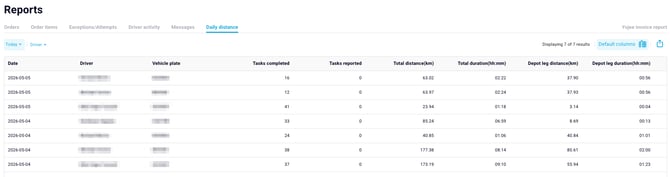
A brand-new **Daily Distance Report** is now available. It shows distance travelled and time on the road per driver per day, calculated automatically from completed task locations. Use it for fleet utilisation reviews, compliance reporting and driver performance conversations — no GPS configuration required.
**🆕 Order Custom Fields in Customer Notification Emails**
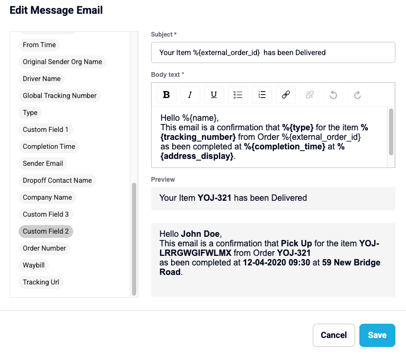
You can now insert any **Order Custom Field** as a dynamic variable in **Customer Notification** email templates. If your business captures purchase orders, references, contacts or special instructions on the order, those values can flow straight into the customer-facing communications without manual editing.
**🆕 Waybill on Transport Orders Page (Column + Search Filter)**
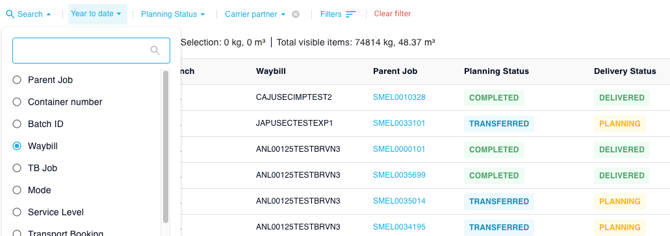
The **Waybill** identifier (introduced in January) is now a first-class column on the **Transport Orders** page and can be searched via the **Reference Number** filter. Dispatchers can locate orders by waybill in one step and see waybill values at a glance in the planning grid.
**🆕 Waybill in the Orders Report and Order Items Report**
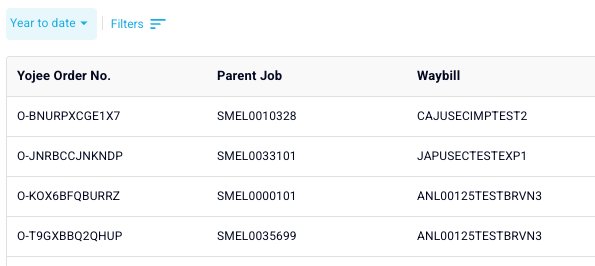
The same \*\***Waybill**\*\* field is now exportable from both the \*\***Orders Report**\*\* and the \*\***Order Items Report**\*\*. Reporting against waybill becomes a single CSV away, useful for end-of-day reconciliation, customer-billing exports and audit trails.
**🆕 Improved Driver App Sync on Low / Intermittent Connectivity**
The **Driver App** has been re-engineered to handle **patchy connectivity** more gracefully. Drivers now see a clear **Pending Sync** state on tasks that have been completed locally but haven't yet been confirmed by the server, and completed tasks are hidden from the active list during sync to reduce confusion. Result: fewer duplicate completions and clearer status when drivers move in and out of coverage.
**🆕 Driver Mileage Calculation Service**
A new mileage calculation service runs in the background to power the Daily Distance Report and future fleet analytics. There's nothing for users to configure, and existing reports continue to behave as before.
**🆕 Driver App: Search and Scan-to-Assign Now Recognise Waybill**
Drivers can now search by **waybill** and use **Scan-to-Assign** with a waybill barcode in the Driver App. This shortens the path from "I have a piece of paper / a barcode" to "I have the right job on screen".
**🆕 Waybill on Mobile Order Info Screen\*\***
The \*\*Order Info\*\* screen in the Driver App now displays the order's \*\*Waybill\*\*, alongside the existing references — so drivers always see the identifier customers ask about.
**🆕 Editable Waybill Field Label**
If "Waybill" isn't the term your operation uses (e.g. "AWB", "Consignment Note", "House Bill"), you can now relabel the field via **Custom Labels**. Both the dispatcher UI and Driver App will reflect the new label everywhere the field appears.
**🆕 "Short Shipped" Filter on the Transport Orders Page**
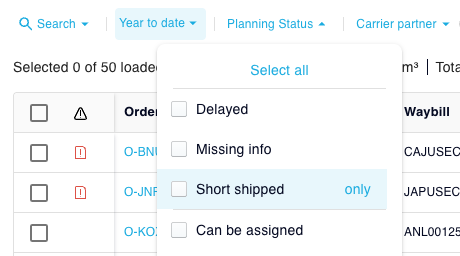
A new **Short Shipped** option is available in the **Planning Status** filter on the Transport Orders page, so dispatchers can quickly isolate orders where partial-quantity shipments have been recorded.
**🆕 Share Driver Contact Number — Toggle and API**
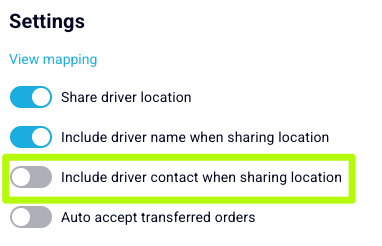
A new **Share Driver Contact Number** toggle lets you control whether the assigned driver's phone number is shared with the customer (e.g. via tracking links). The driver phone number is also now exposed as \`worker\_phone\` in the \*\*Delivery Status API\*\* for integrations that need it.
**🆕 Driver Survey: Trigger Based on Time Interval**
The **Driver Survey** trigger has moved from a daily reset to a **time-interval** model. You can now configure how often a driver should be re-prompted to complete a survey (e.g. every shift, every 12 hours, every 24 hours), instead of being limited to a fixed daily reset.
**🆕 Refreshed TCMS Logo (10-Year Anniversary Edition)**

To mark **Yojee's 10th anniversary**, the TCMS logo has been refreshed on the Driver App and the Login Page. No functional changes — just a celebration of a decade of TCMS.
**🔧 Improvements & Fixes**
**✅ Save / Cancel Button Placement Now Consistent**
Save and Cancel buttons across modals and forms have been standardised to the **bottom-right**, in line with common platform conventions. Reduces hesitation when working across multiple screens.
**✅ Hide Completed Tasks During Sync**
Completed tasks are now hidden from the Driver App task list while sync is in progress, then reappear in their final state once the server confirms — eliminating the brief "ghost task" flicker drivers were seeing.
**✅ Update Charges API Now Accepts Decimal Values**
The Update Charges API previously returned a 500 error when charge values contained decimals on the sell side. Decimal charges now save correctly.
**✅ Translation Corrections**
Two minor translation issues have been corrected in the dispatcher UI.
**✅ Driver App: Photos from Gallery Respect Company Settings**
The "Add from gallery" option in the Driver App now correctly honours the back-office photo settings (e.g. camera-only mode), matching behaviour everywhere a photo is captured.
**✅ Reliable Order Status on Two-Level Transfers**
Orders transferred two levels down (TCMS → Downstream → Sub-downstream) are now reflecting the correct status on the second leg.
- [Quick Start Guides](https://help.yojee.com/knowledge/quick-start-guides?hsLang=en)
- [Power Up with Yojee - Training Sessions](https://help.yojee.com/knowledge/power-up-with-yojee-training-sessions?hsLang=en)
- [Dispatchers](https://help.yojee.com/knowledge/dispatchers?hsLang=en#main-content)
- [Creating Orders](https://help.yojee.com/knowledge/dispatchers?hsLang=en#creating-orders)
- [Managing Orders](https://help.yojee.com/knowledge/dispatchers?hsLang=en#managing-orders)
- [Dispatching Orders](https://help.yojee.com/knowledge/dispatchers?hsLang=en#dispatching-orders)
- [Tracking Orders](https://help.yojee.com/knowledge/dispatchers?hsLang=en#tracking-orders)
- [Partners](https://help.yojee.com/knowledge/dispatchers?hsLang=en#partners)
- [Network](https://help.yojee.com/knowledge/dispatchers?hsLang=en#network)
- [Drivers](https://help.yojee.com/knowledge/drivers?hsLang=en)
- [Senders](https://help.yojee.com/knowledge/senders?hsLang=en)
- [Partners](https://help.yojee.com/knowledge/partners?hsLang=en)
- [Manage](https://help.yojee.com/knowledge/manage?hsLang=en#main-content)
- [Account](https://help.yojee.com/knowledge/manage?hsLang=en#account)
- [Users](https://help.yojee.com/knowledge/manage?hsLang=en#users)
- [Fleet](https://help.yojee.com/knowledge/manage?hsLang=en#fleet)
- [Drivers](https://help.yojee.com/knowledge/manage?hsLang=en#drivers)
- [Addresses](https://help.yojee.com/knowledge/manage?hsLang=en#addresses)
- [Customers](https://help.yojee.com/knowledge/manage?hsLang=en#customers)
- [Orders](https://help.yojee.com/knowledge/manage?hsLang=en#orders)
- [Planning](https://help.yojee.com/knowledge/manage?hsLang=en#planning)
- [Documentation](https://help.yojee.com/knowledge/manage?hsLang=en#documentation)
- [Finance](https://help.yojee.com/knowledge/manage?hsLang=en#finance)
- [Partners](https://help.yojee.com/knowledge/manage?hsLang=en#partners)
- [Analytics](https://help.yojee.com/knowledge/analytics?hsLang=en#main-content)
- [Dashboards](https://help.yojee.com/knowledge/analytics?hsLang=en#dashboards)
- [Reports](https://help.yojee.com/knowledge/analytics?hsLang=en#reports)
- [API Documentation](https://help.yojee.com/knowledge/api-documentation?hsLang=en)
- [FAQ and Glossary](https://help.yojee.com/knowledge/faq-and-glossary?hsLang=en#main-content)
- [Drivers & Planning](https://help.yojee.com/knowledge/faq-and-glossary?hsLang=en#drivers-planning)
- [Glossary](https://help.yojee.com/knowledge/faq-and-glossary?hsLang=en#glossary)
- [Reports](https://help.yojee.com/knowledge/faq-and-glossary?hsLang=en#reports)
- [Other](https://help.yojee.com/knowledge/faq-and-glossary?hsLang=en#other)
- [Release Notes](https://help.yojee.com/knowledge/release-notes?hsLang=en#main-content)
- [Release Notes 2026](https://help.yojee.com/knowledge/release-notes?hsLang=en#release-notes-2026)
- [Release Notes 2025](https://help.yojee.com/knowledge/release-notes?hsLang=en#release-notes-2025)
- [Release Notes 2024](https://help.yojee.com/knowledge/release-notes?hsLang=en#release-notes-2024)
- [Release Notes 2023](https://help.yojee.com/knowledge/release-notes?hsLang=en#release-notes-2023)
- [Release Notes 2022](https://help.yojee.com/knowledge/release-notes?hsLang=en#release-notes-2022)
- [Release Notes 2021](https://help.yojee.com/knowledge/release-notes?hsLang=en#release-notes-2021)
- [Release Notes 2020](https://help.yojee.com/knowledge/release-notes?hsLang=en#release-notes-2020)
- [New Starter Training](https://help.yojee.com/knowledge/new-starter-training?hsLang=en#main-content)
- [Level 1](https://help.yojee.com/knowledge/new-starter-training?hsLang=en#level-1)
[](https://www.yojee.com)
TCMS Knowledge Base
[mailto:support@yojee.com](mailto:support@yojee.com)
Copyright © 2026 Yojee Pte Ltd