---
title: Release Notes - July 2026
description: "July 2026 brings the biggest TCMS release of the year: the all-new Dashboards experience with custom tabs and drag-and-drop widgets, desktop notifications for driver messages, scheduled-report unsubscribe, and documents that stay visible on cancelled orders."
---
[Skip to content](https://help.yojee.com/knowledge/release-notes-july-2026#main-content)
English
Show submenu for translations

- Knowledge Base
Open main navigation
Close main navigation
- Knowledge Base
- English
Show submenu for translations
- [Go to yojee.com](https://www.yojee.com/)
[Go to yojee.com](https://www.yojee.com/)
Hello. How can we help you?
- There are no suggestions because the search field is empty.
1. [Knowledge Base](https://help.yojee.com/knowledge?hsLang=en)
2. [Release Notes](https://help.yojee.com/knowledge/release-notes?hsLang=en)
3. [Release Notes 2026](https://help.yojee.com/knowledge/release-notes?hsLang=en#release-notes-2026)
# Release Notes - July 2026
## Introducing Dashboards, driver message notifications and smarter document visibility.
#### **🆕 Introducing Dashboards — Custom Tabs and Drag-and-Drop Widgets**
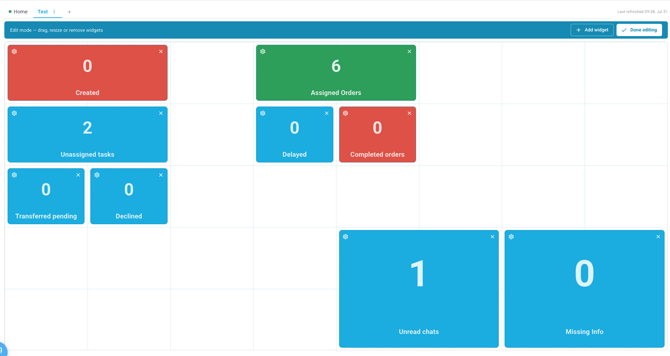
**Our biggest release this year.** You can soon build your own **Dashboards** in TCMS: create multiple **tabs** for different views of your operation, and arrange **widgets** on a flexible grid layout to suit how your team works.
Set up a tab for your morning stand-up, another for your fleet controllers, another for the exec view. Each tab holds whatever widgets matter for that audience, positioned where you want them.
Dashboards is rolling out progressively. **Speak to your Customer Success contact to have it enabled for your account.**
#### **🆕 Truck Availability Widget**
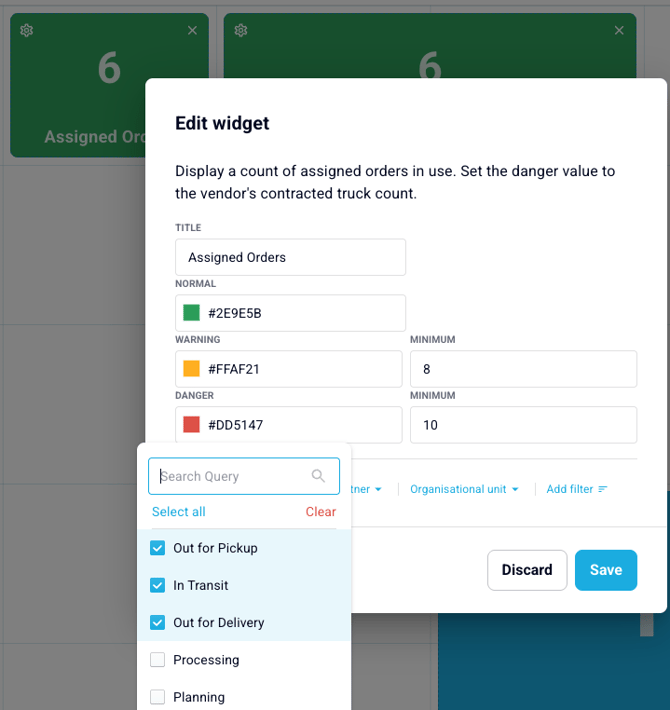
A new **Assigned Orders** widget shows how many orders are currently assigned, with optional **targets** so you can see availability at a glance. Filter by **Partner**, **Organisational Unit** or **Vehicle Tag** to break the view down by vendor, branch or fleet type.
#### **🆕 Desktop Notifications for Driver Messages**
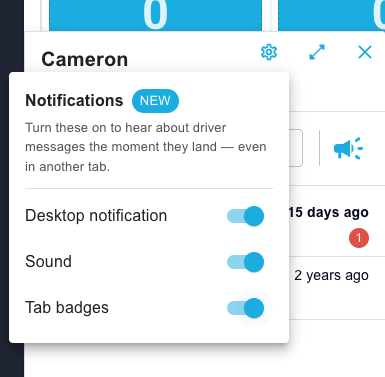
Never miss a message from a driver again. When a driver sends an in-app message, you'll now get a **desktop notification**, an audible **alert**, and a **badge on the browser tab** — so you'll see it even when TCMS isn't your active window.
Notifications are **opt-in per user** and configurable directly from the chat settings, so you decide whether you want sound, desktop popups, or both.
#### **🆕 Unsubscribe From Scheduled Reports**
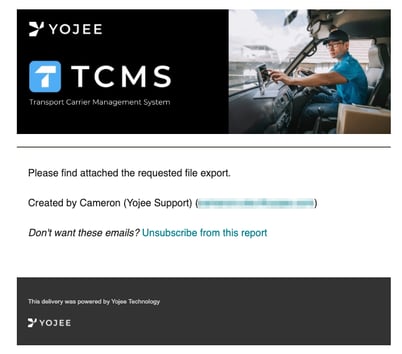
Two improvements to **scheduled report emails**. Each email now clearly shows **who set the schedule up**, so you know who to contact about it. And recipients can **unsubscribe directly from the email** rather than having to track down the report owner.
Scheduled reports owned by a deactivated user are now also **automatically deactivated**, so reports don't keep arriving from people who've left.
#### **🆕 Documents Stay Available on Cancelled and Failed Orders**
Previously, cancelling an order hid its **Documents** tab, taking driver POD and POC photos with it. Those documents now **remain accessible** on cancelled and failed orders, so evidence captured before the cancellation is never lost.
#### **🆕 See Which Orders Have Documents at a Glance**
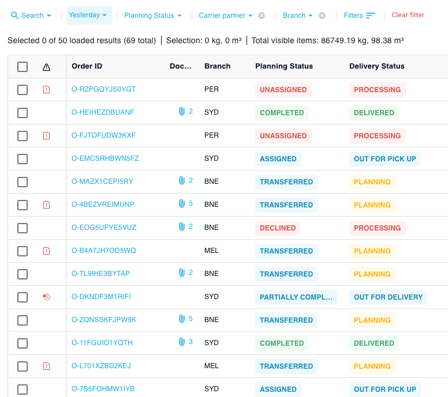
The **Transport Orders** page now shows an **indicator** on any order that has documents attached. Dispatchers can spot which jobs have paperwork without opening each order individually.
#### **🆕 Treat First Geofence Entry as Arrival**
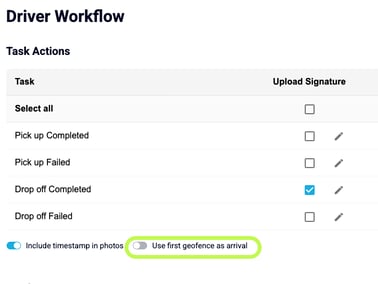
A new **Driver Workflow** toggle lets you treat a driver's **first geofence entry** as the arrival milestone, rather than requiring the driver to tap an explicit "arrived" action. Reduces taps for drivers and produces more consistent arrival timestamps for reporting.
---
#### **🔧 Improvements & Fixes**
✅ **Partner Transfers No Longer Stall Silently** A scenario where a transferred order could sit indefinitely in **"pending transfer"** without the receiving carrier ever being notified, and without surfacing an error, has been fixed. Stuck orders were also reprocessed.
✅ **Bookings With Valid Times No Longer Rejected** Pickup and delivery step times coming in from CargoWise were being converted to UTC inconsistently, which caused some **valid bookings to be rejected**. Conversion is now consistent across both steps.
✅ **Clearer API Error When Order Items Are Missing Steps** Creating an order with an order item that has no steps was returning a generic **500 error**. The API now returns a clear validation message explaining what's missing.
- [Quick Start Guides](https://help.yojee.com/knowledge/quick-start-guides?hsLang=en)
- [Power Up with Yojee - Training Sessions](https://help.yojee.com/knowledge/power-up-with-yojee-training-sessions?hsLang=en)
- [Dispatchers](https://help.yojee.com/knowledge/dispatchers?hsLang=en#main-content)
- [Creating Orders](https://help.yojee.com/knowledge/dispatchers?hsLang=en#creating-orders)
- [Managing Orders](https://help.yojee.com/knowledge/dispatchers?hsLang=en#managing-orders)
- [Dispatching Orders](https://help.yojee.com/knowledge/dispatchers?hsLang=en#dispatching-orders)
- [Tracking Orders](https://help.yojee.com/knowledge/dispatchers?hsLang=en#tracking-orders)
- [Partners](https://help.yojee.com/knowledge/dispatchers?hsLang=en#partners)
- [Network](https://help.yojee.com/knowledge/dispatchers?hsLang=en#network)
- [Drivers](https://help.yojee.com/knowledge/drivers?hsLang=en)
- [Senders](https://help.yojee.com/knowledge/senders?hsLang=en)
- [Partners](https://help.yojee.com/knowledge/partners?hsLang=en)
- [Manage](https://help.yojee.com/knowledge/manage?hsLang=en#main-content)
- [Account](https://help.yojee.com/knowledge/manage?hsLang=en#account)
- [Users](https://help.yojee.com/knowledge/manage?hsLang=en#users)
- [Fleet](https://help.yojee.com/knowledge/manage?hsLang=en#fleet)
- [Drivers](https://help.yojee.com/knowledge/manage?hsLang=en#drivers)
- [Addresses](https://help.yojee.com/knowledge/manage?hsLang=en#addresses)
- [Customers](https://help.yojee.com/knowledge/manage?hsLang=en#customers)
- [Orders](https://help.yojee.com/knowledge/manage?hsLang=en#orders)
- [Planning](https://help.yojee.com/knowledge/manage?hsLang=en#planning)
- [Documentation](https://help.yojee.com/knowledge/manage?hsLang=en#documentation)
- [Finance](https://help.yojee.com/knowledge/manage?hsLang=en#finance)
- [Partners](https://help.yojee.com/knowledge/manage?hsLang=en#partners)
- [Analytics](https://help.yojee.com/knowledge/analytics?hsLang=en#main-content)
- [Dashboards](https://help.yojee.com/knowledge/analytics?hsLang=en#dashboards)
- [Reports](https://help.yojee.com/knowledge/analytics?hsLang=en#reports)
- [API Documentation](https://help.yojee.com/knowledge/api-documentation?hsLang=en)
- [FAQ and Glossary](https://help.yojee.com/knowledge/faq-and-glossary?hsLang=en#main-content)
- [Drivers & Planning](https://help.yojee.com/knowledge/faq-and-glossary?hsLang=en#drivers-planning)
- [Glossary](https://help.yojee.com/knowledge/faq-and-glossary?hsLang=en#glossary)
- [Reports](https://help.yojee.com/knowledge/faq-and-glossary?hsLang=en#reports)
- [Other](https://help.yojee.com/knowledge/faq-and-glossary?hsLang=en#other)
- [Release Notes](https://help.yojee.com/knowledge/release-notes?hsLang=en#main-content)
- [Release Notes 2026](https://help.yojee.com/knowledge/release-notes?hsLang=en#release-notes-2026)
- [Release Notes 2025](https://help.yojee.com/knowledge/release-notes?hsLang=en#release-notes-2025)
- [Release Notes 2024](https://help.yojee.com/knowledge/release-notes?hsLang=en#release-notes-2024)
- [Release Notes 2023](https://help.yojee.com/knowledge/release-notes?hsLang=en#release-notes-2023)
- [Release Notes 2022](https://help.yojee.com/knowledge/release-notes?hsLang=en#release-notes-2022)
- [Release Notes 2021](https://help.yojee.com/knowledge/release-notes?hsLang=en#release-notes-2021)
- [Release Notes 2020](https://help.yojee.com/knowledge/release-notes?hsLang=en#release-notes-2020)
- [New Starter Training](https://help.yojee.com/knowledge/new-starter-training?hsLang=en#main-content)
- [Level 1](https://help.yojee.com/knowledge/new-starter-training?hsLang=en#level-1)
[](https://www.yojee.com)
TCMS Knowledge Base
[mailto:support@yojee.com](mailto:support@yojee.com)
Copyright © 2026 Yojee Pte Ltd