---
title: Release Notes - April 2026
description: April 2026 TCMS updates include OU-specific document branding, geofence enter/exit timestamps in the Driver App, configurable Team Notification fields, alert-column improvements on Transport Orders and several Daily Distance Report refinements.
---
[Skip to content](https://help.yojee.com/knowledge/release-notes-april-2026#main-content)
English
Show submenu for translations

- Knowledge Base
Open main navigation
Close main navigation
- Knowledge Base
- English
Show submenu for translations
- [Go to yojee.com](https://www.yojee.com/)
[Go to yojee.com](https://www.yojee.com/)
Hello. How can we help you?
- There are no suggestions because the search field is empty.
1. [Knowledge Base](https://help.yojee.com/knowledge?hsLang=en)
2. [Release Notes](https://help.yojee.com/knowledge/release-notes?hsLang=en)
3. [Release Notes 2026](https://help.yojee.com/knowledge/release-notes?hsLang=en#release-notes-2026)
# Release Notes - April 2026
## OU-specific document branding, geofence timestamps and smarter alerts on Transport Orders
**🆕 OU-Specific Branding on PODs, Labels and Connotes**
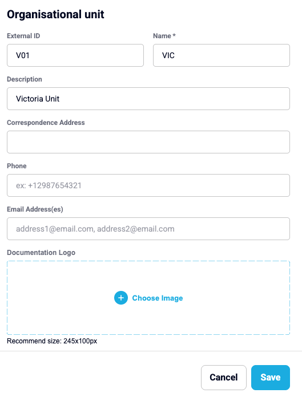
A new **Documentation Logo** field on **OU (Organisational Unit) Settings** lets each OU define its own logo for **PODs, labels and connotes**. Multi-brand or multi-business-unit operations can now produce documentation that reflects the right brand on every transport doc, without manual editing.
**🆕 Geofence Enter / Exit Timestamps Captured in the Driver App**
The Driver App now records the precise **time a driver enters and exits each task geofence**. These timestamps unlock more accurate **time-on-site**, dwell-time analytics and ETA reporting, and form the foundation for upcoming reporting enhancements.
**🆕 Custom Field Filtering on Every Reports Tab**
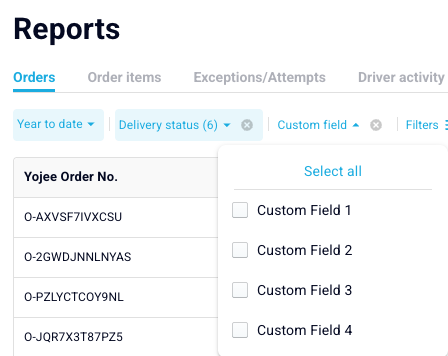
**Custom Field filters** (Custom Fields 1–4) are now available consistently across **every tab** of the Reports section — Orders, Order Items, Daily Activity. If you've been filtering by Custom Field on one tab and missing it on another, that gap is now closed.
**🆕 Configurable Team Notification Fields per Slug**

The fields shown in **Team Notification emails** can now be **configured per slug**, instead of a fixed set. Each operation can choose which order fields are surfaced in its team-facing notifications, keeping the email focused on what your dispatchers actually need.
**🆕 New "Planned Order Changes" Team Notification**
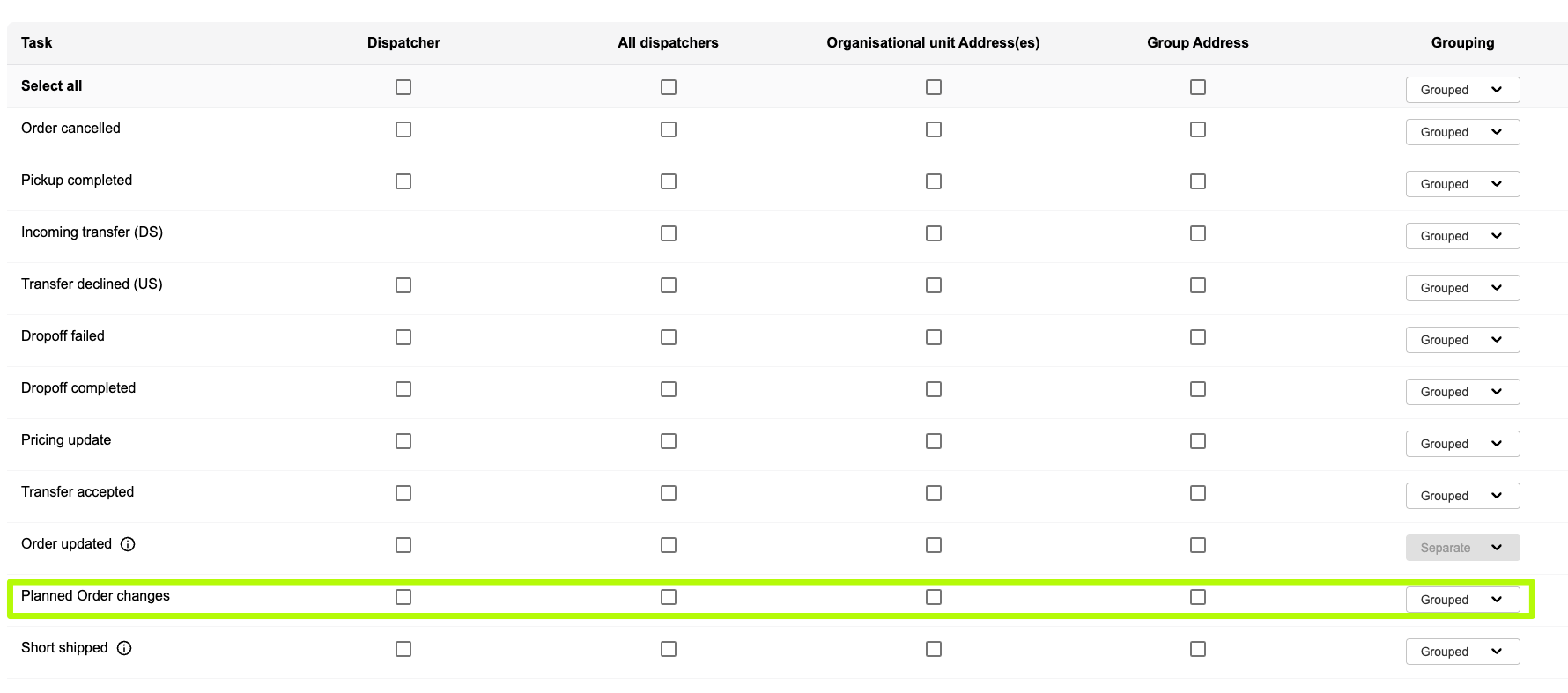
A new **Planned Order Changes** trigger has been added to **Team Notifications**, so dispatchers receive an email when scheduling shifts on planned orders. Useful for teams that don't sit in the dispatcher UI all day but still need visibility on plan changes.
**🆕 Container Number on the Transfer Accepted Email**
The **Transfer Accepted** team notification email now includes the **container number** (where present), so the receiving partner can immediately link the accepted order to a physical container without opening the dispatcher UI.
**🆕 Smarter Alerts on the Transport Orders Page**
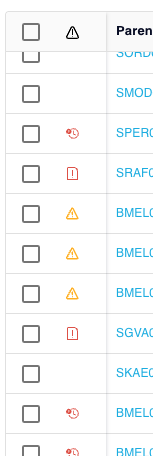
The **alert column** on the **Transport Orders Page** has had a refresh: it now shows an **Order Updated** warning when an order has changed since acceptance, a **Short Shipped** icon for orders fulfilled with reduced quantities, and tooltips on hover so dispatchers can see exactly what each alert means without opening the order.
**🆕 Daily Distance Report: Smarter Duration Calculation**
The **Daily Distance Report** now uses **task completion times** for duration calculations, with a sensible fallback for depot legs (start of shift / end of shift). Driver-time figures are now more reflective of actual on-the-road time rather than dispatcher planning windows.
**🆕 Daily Distance Report: Cleaner Number Formatting**
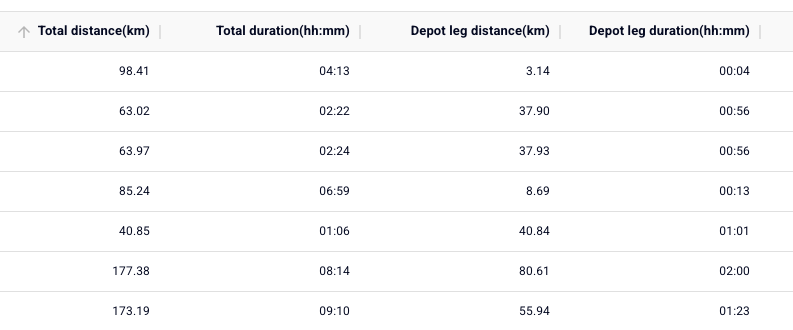
A round of polish on the **Daily Distance Report**: distances now display with units, scientific notation has been removed, and decimal precision is consistent across all rows. Easier to read and easier to share with stakeholders.
**🔧 Improvements & Fixes**
**✅ Order Updated Email Now Uses Local Time**
The **Order Updated** team notification was rendering slot date/time in UTC, which was confusing for teams outside UTC. It now displays in the slug's local timezone, with the timezone clearly shown.
**✅ Transfer Accepted Email — External Order ID Label Restored**
The **Transfer Accepted** team notification was missing the custom label for **External Order ID**. The label is now displayed correctly, matching the dispatcher UI.
**✅ Cancelled and Completed Orders Now Flow into Reports**
A reporting pipeline issue meant cancelled and completed orders weren't appearing in some reports. They now flow through correctly, including for backfilled records.
**✅ Driver App: Location Permission Prompt on First Launch**
The first **location-permission prompt** in the Driver App was being delayed after install. Drivers now see the prompt immediately on first launch.
**✅ Driver App: Connote PODs Now Render Correctly**
**Connote-template PODs** were rendering in the wrong format on certain templates. The format has been corrected and tested across the supported template variants.
**✅ Driver App: Sync Icon Fixed (Cosmetic)**
The Driver App's **sync icon** was animating backwards. It now spins the right way around — no functional change.
**✅ Driver App: Container-Number Scan No Longer Crashes**
A specific scenario in **Driver App 1.28** was causing the app to crash when scanning a container number. The crash has been fixed.
**✅ Driver App: General Scan Crash Fixed**
A separate scan-related crash on certain devices has also been resolved.
**✅ Driver Surveys: "Vehicles-only" Surveys Now Sync**
Driver Surveys consisting **only of "confirm assigned vehicles"** weren't syncing. They now sync reliably alongside other survey responses.
**✅ TOP CSV Exports Now Surface Errors**
Large CSV exports from the **Transport Orders Page** were silently failing without notifying the user. Failures now surface a clear error message, so dispatchers know to retry instead of waiting indefinitely.
**✅ Daily Distance Report: Double-Counting Eliminated**
A double-counting issue in distance and duration values on the **Daily Distance Report** has been corrected. Historical figures are unaffected; new entries calculate accurately.
**✅ Order Duplication Now Respects Deletions**
**Duplicating an order** was bringing back item lines that had been deleted. Duplication now correctly carries forward only the lines that were active on the source order.
**✅ Unassign Order: 403 Permissions Edge Case Resolved**
Unassigning an order from a driver was returning a **403 error** in some role configurations. Permissions have been corrected and the action now works for the expected roles.
- [Quick Start Guides](https://help.yojee.com/knowledge/quick-start-guides?hsLang=en)
- [Power Up with Yojee - Training Sessions](https://help.yojee.com/knowledge/power-up-with-yojee-training-sessions?hsLang=en)
- [Dispatchers](https://help.yojee.com/knowledge/dispatchers?hsLang=en#main-content)
- [Creating Orders](https://help.yojee.com/knowledge/dispatchers?hsLang=en#creating-orders)
- [Managing Orders](https://help.yojee.com/knowledge/dispatchers?hsLang=en#managing-orders)
- [Dispatching Orders](https://help.yojee.com/knowledge/dispatchers?hsLang=en#dispatching-orders)
- [Tracking Orders](https://help.yojee.com/knowledge/dispatchers?hsLang=en#tracking-orders)
- [Partners](https://help.yojee.com/knowledge/dispatchers?hsLang=en#partners)
- [Network](https://help.yojee.com/knowledge/dispatchers?hsLang=en#network)
- [Drivers](https://help.yojee.com/knowledge/drivers?hsLang=en)
- [Senders](https://help.yojee.com/knowledge/senders?hsLang=en)
- [Partners](https://help.yojee.com/knowledge/partners?hsLang=en)
- [Manage](https://help.yojee.com/knowledge/manage?hsLang=en#main-content)
- [Account](https://help.yojee.com/knowledge/manage?hsLang=en#account)
- [Users](https://help.yojee.com/knowledge/manage?hsLang=en#users)
- [Fleet](https://help.yojee.com/knowledge/manage?hsLang=en#fleet)
- [Drivers](https://help.yojee.com/knowledge/manage?hsLang=en#drivers)
- [Addresses](https://help.yojee.com/knowledge/manage?hsLang=en#addresses)
- [Customers](https://help.yojee.com/knowledge/manage?hsLang=en#customers)
- [Orders](https://help.yojee.com/knowledge/manage?hsLang=en#orders)
- [Planning](https://help.yojee.com/knowledge/manage?hsLang=en#planning)
- [Documentation](https://help.yojee.com/knowledge/manage?hsLang=en#documentation)
- [Finance](https://help.yojee.com/knowledge/manage?hsLang=en#finance)
- [Partners](https://help.yojee.com/knowledge/manage?hsLang=en#partners)
- [Analytics](https://help.yojee.com/knowledge/analytics?hsLang=en#main-content)
- [Dashboards](https://help.yojee.com/knowledge/analytics?hsLang=en#dashboards)
- [Reports](https://help.yojee.com/knowledge/analytics?hsLang=en#reports)
- [API Documentation](https://help.yojee.com/knowledge/api-documentation?hsLang=en)
- [FAQ and Glossary](https://help.yojee.com/knowledge/faq-and-glossary?hsLang=en#main-content)
- [Drivers & Planning](https://help.yojee.com/knowledge/faq-and-glossary?hsLang=en#drivers-planning)
- [Glossary](https://help.yojee.com/knowledge/faq-and-glossary?hsLang=en#glossary)
- [Reports](https://help.yojee.com/knowledge/faq-and-glossary?hsLang=en#reports)
- [Other](https://help.yojee.com/knowledge/faq-and-glossary?hsLang=en#other)
- [Release Notes](https://help.yojee.com/knowledge/release-notes?hsLang=en#main-content)
- [Release Notes 2026](https://help.yojee.com/knowledge/release-notes?hsLang=en#release-notes-2026)
- [Release Notes 2025](https://help.yojee.com/knowledge/release-notes?hsLang=en#release-notes-2025)
- [Release Notes 2024](https://help.yojee.com/knowledge/release-notes?hsLang=en#release-notes-2024)
- [Release Notes 2023](https://help.yojee.com/knowledge/release-notes?hsLang=en#release-notes-2023)
- [Release Notes 2022](https://help.yojee.com/knowledge/release-notes?hsLang=en#release-notes-2022)
- [Release Notes 2021](https://help.yojee.com/knowledge/release-notes?hsLang=en#release-notes-2021)
- [Release Notes 2020](https://help.yojee.com/knowledge/release-notes?hsLang=en#release-notes-2020)
- [New Starter Training](https://help.yojee.com/knowledge/new-starter-training?hsLang=en#main-content)
- [Level 1](https://help.yojee.com/knowledge/new-starter-training?hsLang=en#level-1)
[](https://www.yojee.com)
TCMS Knowledge Base
[mailto:support@yojee.com](mailto:support@yojee.com)
Copyright © 2026 Yojee Pte Ltd