---
title: Optimise Your Deliveries with Yojee Address Book
description: Learn how to use Yojee's Address Book to manage preset addresses, link senders, and optimise deliveries with accurate coordinates, opening hours, and points of interest.
---
[Skip to content](https://help.yojee.com/knowledge/address-book#main-content)
English
Show submenu for translations

- Knowledge Base
Open main navigation
Close main navigation
- Knowledge Base
- English
Show submenu for translations
- [Go to yojee.com](https://www.yojee.com/)
[Go to yojee.com](https://www.yojee.com/)
Hello. How can we help you?
- There are no suggestions because the search field is empty.
1. [Knowledge Base](https://help.yojee.com/knowledge?hsLang=en)
2. [Manage](https://help.yojee.com/knowledge/manage?hsLang=en)
3. [Addresses](https://help.yojee.com/knowledge/manage?hsLang=en#addresses)
# Optimise Your Deliveries with Yojee Address Book
## Create and manage preset addresses with precise coordinates to streamline order planning, optimisation, and execution.
### **Overview**
The **Yojee Address Book** allows you to create and manage preset addresses with accurate latitude and longitude coordinates. By using Address Book entries, orders are automatically linked to the corresponding addresses, ensuring:
- **Optimised Planning** with accurate coordinates.
- **Efficient Delivery Execution** with points of interest and contact details.
- **Improved Accuracy** by specifying opening/closing hours and address types.
---
### **1. Creating Addresses**
To access the Address Book:
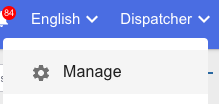
1. Navigate to **Manage** (in the top right Profile menu)
****
2. Then navigate to **Addresses** and select **Add Address**.

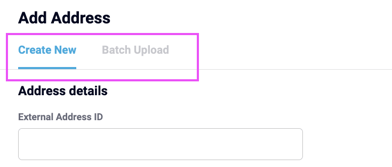
3. Add addresses in two ways:
- **Individually**: Use the **Create New** tab.
- **Batch Upload**: Upload a file for bulk addition of addresses.
**Tip**: All mandatory fields are marked with an asterisk (\*).
---
### **2. Tags and Address Types**
#### ****
#### **What Are Tags?**
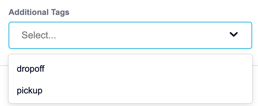
Tags help you categorise and filter addresses when creating or managing orders. You can easily locate specific addresses in the **Task List** or **Explore** views using relevant tags.
#### ****
#### **What Is Address Type?**
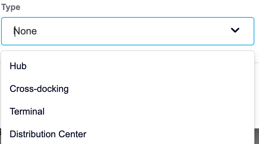
Address types define the location’s purpose and ensure the correct application of rules during service time configurations. Examples include:
- **Warehouse**
- **Loading Bay**
- **Office**
Selecting the appropriate location type ensures the addressing system works seamlessly.
---
### **3. Linking Addresses to Senders**
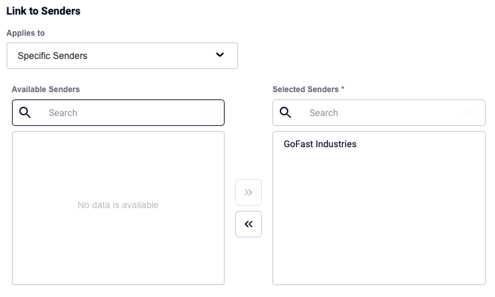
You can link addresses to specific senders:
1. Under **Applies to**, select **"Specific Senders"**.
2. Choose senders from the available list.
3. Once added to the **Selected Senders** column, the address will be accessible to those senders in their booking portal.
---
### **4. Points of Interest vs. Latitude/Longitude**
Yojee balances the need for:
- **Precise Coordinates (Lat/Long)**: Required for system accuracy and GPS routing.
- **Convenient Points of Interest**: Preferred by drivers for easy identification (e.g., "Dubai Mall Loading Bay").
#### **Why It Matters**
- **Drivers**: Access clear points of interest alongside accurate GPS coordinates.
- **Dispatchers**: Avoid confusion over frequently used or ambiguous location names like “Westport” or “my warehouse.”
- **Customers**: Ensure deliveries reach the right place and contact without delays.
---
### **5. Address Book in Action**
When orders use addresses from the Address Book:
- Entries are **automatically linked** to tasks during manual or batch order creation.
- Accurate **latitude/longitude** ensures optimised planning and routing.
- **Opening and closing hours** are applied during optimisation.
#### **During Execution**
Drivers can access:
- Point of interest name for easy reference.
- Accurate coordinates for GPS navigation.
- Contact name and number for coordination.
---
### **6. Notifications**
Notifications (if enabled) are sent directly to the contact listed in the Address Book entry, ensuring accurate updates for pickup and drop-off activities.
---
### **Need Help?**
For additional support or questions, contact us at **support@yojee.com**. We’re happy to assist! 🙌
- [Quick Start Guides](https://help.yojee.com/knowledge/quick-start-guides?hsLang=en)
- [Power Up with Yojee - Training Sessions](https://help.yojee.com/knowledge/power-up-with-yojee-training-sessions?hsLang=en)
- [Dispatchers](https://help.yojee.com/knowledge/dispatchers?hsLang=en#main-content)
- [Creating Orders](https://help.yojee.com/knowledge/dispatchers?hsLang=en#creating-orders)
- [Managing Orders](https://help.yojee.com/knowledge/dispatchers?hsLang=en#managing-orders)
- [Dispatching Orders](https://help.yojee.com/knowledge/dispatchers?hsLang=en#dispatching-orders)
- [Tracking Orders](https://help.yojee.com/knowledge/dispatchers?hsLang=en#tracking-orders)
- [Partners](https://help.yojee.com/knowledge/dispatchers?hsLang=en#partners)
- [Network](https://help.yojee.com/knowledge/dispatchers?hsLang=en#network)
- [Drivers](https://help.yojee.com/knowledge/drivers?hsLang=en)
- [Senders](https://help.yojee.com/knowledge/senders?hsLang=en)
- [Partners](https://help.yojee.com/knowledge/partners?hsLang=en)
- [Manage](https://help.yojee.com/knowledge/manage?hsLang=en#main-content)
- [Account](https://help.yojee.com/knowledge/manage?hsLang=en#account)
- [Users](https://help.yojee.com/knowledge/manage?hsLang=en#users)
- [Fleet](https://help.yojee.com/knowledge/manage?hsLang=en#fleet)
- [Drivers](https://help.yojee.com/knowledge/manage?hsLang=en#drivers)
- [Addresses](https://help.yojee.com/knowledge/manage?hsLang=en#addresses)
- [Customers](https://help.yojee.com/knowledge/manage?hsLang=en#customers)
- [Orders](https://help.yojee.com/knowledge/manage?hsLang=en#orders)
- [Planning](https://help.yojee.com/knowledge/manage?hsLang=en#planning)
- [Documentation](https://help.yojee.com/knowledge/manage?hsLang=en#documentation)
- [Finance](https://help.yojee.com/knowledge/manage?hsLang=en#finance)
- [Partners](https://help.yojee.com/knowledge/manage?hsLang=en#partners)
- [Analytics](https://help.yojee.com/knowledge/analytics?hsLang=en#main-content)
- [Dashboards](https://help.yojee.com/knowledge/analytics?hsLang=en#dashboards)
- [Reports](https://help.yojee.com/knowledge/analytics?hsLang=en#reports)
- [API Documentation](https://help.yojee.com/knowledge/api-documentation?hsLang=en)
- [FAQ and Glossary](https://help.yojee.com/knowledge/faq-and-glossary?hsLang=en#main-content)
- [Drivers & Planning](https://help.yojee.com/knowledge/faq-and-glossary?hsLang=en#drivers-planning)
- [Glossary](https://help.yojee.com/knowledge/faq-and-glossary?hsLang=en#glossary)
- [Reports](https://help.yojee.com/knowledge/faq-and-glossary?hsLang=en#reports)
- [Other](https://help.yojee.com/knowledge/faq-and-glossary?hsLang=en#other)
- [Release Notes](https://help.yojee.com/knowledge/release-notes?hsLang=en#main-content)
- [Release Notes 2026](https://help.yojee.com/knowledge/release-notes?hsLang=en#release-notes-2026)
- [Release Notes 2025](https://help.yojee.com/knowledge/release-notes?hsLang=en#release-notes-2025)
- [Release Notes 2024](https://help.yojee.com/knowledge/release-notes?hsLang=en#release-notes-2024)
- [Release Notes 2023](https://help.yojee.com/knowledge/release-notes?hsLang=en#release-notes-2023)
- [Release Notes 2022](https://help.yojee.com/knowledge/release-notes?hsLang=en#release-notes-2022)
- [Release Notes 2021](https://help.yojee.com/knowledge/release-notes?hsLang=en#release-notes-2021)
- [Release Notes 2020](https://help.yojee.com/knowledge/release-notes?hsLang=en#release-notes-2020)
- [New Starter Training](https://help.yojee.com/knowledge/new-starter-training?hsLang=en#main-content)
- [Level 1](https://help.yojee.com/knowledge/new-starter-training?hsLang=en#level-1)
[](https://www.yojee.com)
TCMS Knowledge Base
[mailto:support@yojee.com](mailto:support@yojee.com)
Copyright © 2026 Yojee Pte Ltd